

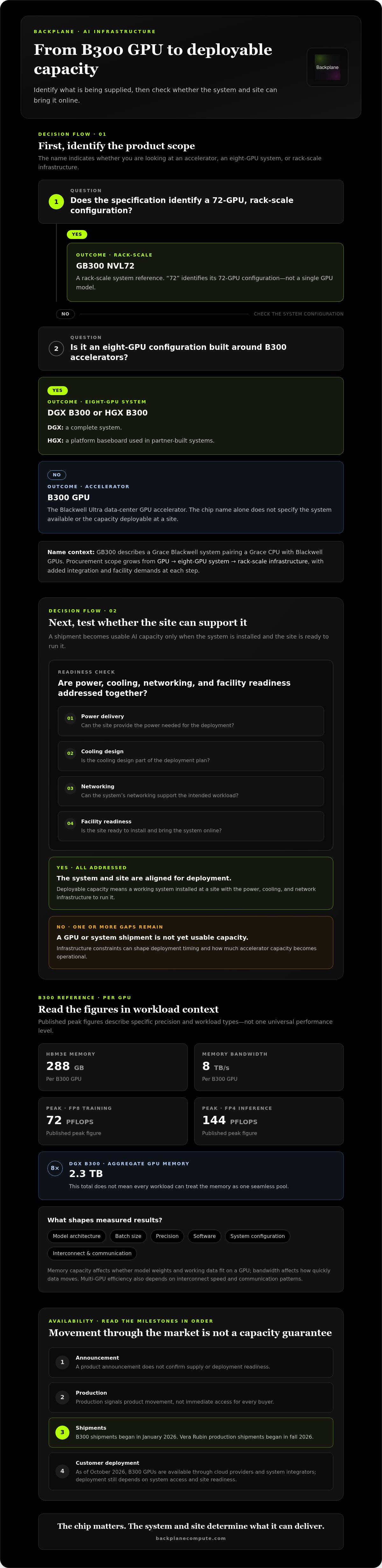
A GPU shipment doesn’t create usable AI capacity on its own. The b300 gpu began shipping in January 2026, but its market impact depends on what can be installed, powered, cooled, and brought online. That’s why it matters to distinguish between a B300 GPU, an eight-GPU DGX B300 system, and a 72-GPU GB300 NVL72 rack.
The interest is understandable. NVIDIA’s Blackwell Ultra architecture brings more compute for demanding AI workloads. But a product announcement, a system shipment, and capacity ready for deployment are different milestones. Power availability, cooling design, networking, and site readiness all affect how much compute operators can put to work.
This guide explains where the B300 sits in NVIDIA’s roadmap and how it relates to DGX B300, HGX B300, and GB300 NVL72 configurations. It also reviews availability signals without treating them as a guarantee of supply, then examines the infrastructure constraints that can shape deployment timing and usable capacity. The central point is simple: the chip matters, but the system and site determine what it can deliver.
Key Takeaways
- Distinguish the b300 gpu from the DGX, HGX, and rack-scale systems that package it. Each represents a different deployment decision.
- Assess architecture claims against workload-relevant specifications, not headline performance figures alone.
- Read availability signals in sequence: announcements, production, shipments, and customer deployments indicate different stages of market access.
- Assess power delivery, cooling, networking, and facility readiness together to estimate how much accelerator capacity can become operational.
- Track workload fit and site viability alongside hardware developments to make better compute and infrastructure decisions.
What Is the B300 GPU, and Where Does It Fit in NVIDIA’s Roadmap?
The B300 is NVIDIA’s Blackwell Ultra data-center GPU, designed for demanding AI and high-performance computing workloads. It represents a new accelerator generation, but the chip name alone doesn’t tell buyers which system they can access or how much capacity they can deploy.
NVIDIA’s roadmap has moved from Blackwell to Blackwell Ultra, with Vera Rubin positioned as the next platform. B300 shipments began in January 2026, and Vera Rubin production shipments began in fall 2026. These milestones indicate product movement, not that every buyer can immediately obtain or deploy a system.
An announced accelerator is a component. Deployable compute capacity is a working system installed at a site with the power, cooling, and network infrastructure to run it.
B300, GB300, and NVL72: What Do the Names Mean?
These labels describe different parts of NVIDIA’s offering. Treating them as interchangeable can obscure what is actually being supplied:
- B300: The Blackwell Ultra GPU accelerator.
- GB300: A Grace Blackwell system context, pairing a Grace CPU with Blackwell GPUs.
- GB300 NVL72: A rack-scale system reference. “72” identifies its 72-GPU configuration, not a single GPU model.
- DGX B300 or HGX B300: Eight-GPU system configurations built around B300 accelerators. DGX is a complete system; HGX is a platform baseboard used in partner-built systems.
The practical distinction is procurement scope. A GPU is an accelerator, an eight-GPU server is a system, and NVL72 is rack-scale infrastructure. Each step adds integration requirements and facility demands.
How the B300 Relates to NVIDIA Blackwell
B300 belongs to NVIDIA’s Blackwell family as its Blackwell Ultra generation. It is designed for enterprise AI and HPC deployment, where buyers evaluate how GPUs, CPUs, networking, software, and facility infrastructure work together, not just the accelerator’s capabilities. For background on the underlying architecture, see NVIDIA’s Blackwell microarchitecture.
For buyers tracking the b300 gpu, the roadmap is a planning signal, not a capacity guarantee. NVIDIA’s next-generation Vera Rubin platform began production shipments in fall 2026. That transition makes workload fit, system access, and infrastructure timing central to deployment decisions. Understanding how powered sites connect with compute demand is also part of evaluating the infrastructure behind AI compute.
B300 GPU Architecture: What Buyers Should Verify Beyond the Headline Specs
The b300 gpu combines high-bandwidth memory, fast GPU interconnects, and support for low-precision AI computation. Those features matter for training and inference, but published peak figures describe specific operating conditions, not guaranteed application outcomes. Assess the accelerator alongside the system it runs in and the software stack supporting the workload.
Memory, Bandwidth, and Performance Claims
Published specifications list 288 GB of HBM3e memory and 8 TB/s of memory bandwidth per B300 GPU. They also cite peak performance of 72 PFLOPS for FP8 training and 144 PFLOPS for FP4 inference. These figures use different precisions and workload types, so they aren’t direct measures of one universal performance level.
Results depend on model architecture, batch size, precision, software, and system configuration. Memory capacity affects whether model weights and working data fit on a GPU; bandwidth affects how quickly data moves. In multi-GPU systems, interconnect speed and communication patterns influence how efficiently work can be distributed. An eight-GPU DGX B300 system has 2.3 TB of total GPU memory, but that aggregate figure doesn’t mean every workload can treat it as one seamless memory pool.
Performance depends on workload, configuration, and software. Peak compute, memory capacity, bandwidth, interconnect, precision, batch size, and model design all shape measured results.
B300 GPU Versus B200: A Workload-Based Comparison
B300 is part of the Blackwell Ultra generation, while B200 is a Blackwell accelerator. A precise comparison requires matched specifications and benchmark conditions. The figures presented here include B300 specifications but not equivalent B200 measurements, so they don’t support a numerical performance-uplift claim.
| Comparison point | B300 | B200 |
|---|---|---|
| Generation | Blackwell Ultra | Blackwell |
| Memory, bandwidth, and peak performance | 288 GB HBM3e; 8 TB/s; 72 PFLOPS FP8 training and 144 PFLOPS FP4 inference | No matched figures included in the specifications used here |
| Workload comparison | Assess using the same model, precision, batch size, and system conditions | Compare only against results measured under equivalent conditions |
For capacity planning, consider how compute access is structured as well as chip specifications. Enterprise GPUs-as-a-Service can help organizations align compute access with workload needs without making hardware ownership the only route to capacity.
B300 GPU Market Outlook: Availability, Demand, and What Remains Uncertain
The B300 market has moved beyond announcement, but availability still has several distinct stages. As of October 2026, NVIDIA B300 GPUs have been shipping since January 2026 and are available through cloud providers and system integrators. GB300 NVL72 systems are in production and shipping to hyperscalers and cloud partners in the second half of 2026. These signals show market movement, not universal access or a guaranteed delivery window.
Demand is driven by expanding generative AI workloads. Training large models requires substantial, coordinated compute, while inference requires capacity to serve models as they are used. Both can increase accelerator demand, but the effect on supply depends on system production, deployment execution, and the infrastructure available to bring systems online.
What Availability Signals Can, and Cannot, Tell You
Interpret each milestone carefully. An announcement describes a product or plan. Production indicates systems are being manufactured. Shipment means equipment is moving to a recipient or channel. Customer deployment is stronger evidence that compute is operating in a specific environment. None of these milestones alone proves that another buyer can secure the same configuration or deployment timing.
Date-stamp availability claims and record their scope. For example, “shipping to cloud partners in the second half of 2026” is not the same as “available to every customer now.” Keep manufacturer statements distinct from evidence of operational deployments. A reseller listing or broad market commentary alone doesn’t confirm allocation, delivery dates, or usable capacity.
How to Read B300 Versus Existing GPU Capacity
Compare the B300 with compute that can serve the workload today, not just with a specification sheet. A newer GPU may suit a model’s memory and compute needs, while existing systems may be more useful if they’re already accessible, integrated, and supported by compatible software. Workload migration, software readiness, and cluster scale all affect the value of a capacity upgrade.
For a fair comparison, establish the required model, performance target, precision, software environment, and number of GPUs. Then assess whether the system’s networking and memory configuration can support the workload at scale. A system that meets a benchmark in isolation may deliver different results when distributed training or production inference adds communication and operational demands.
For high-density workloads, GPUs-as-a-Service is one way to align compute access with deployment needs. Evaluate capacity as an operational resource: what workload it supports, when it can be used, and whether the surrounding system and site can sustain it. The market signal matters, but execution determines usable capacity.
Power, Cooling, and Networking: The Infrastructure Behind B300 Deployment
A shipment is only the starting point. The b300 gpu must operate inside a system that can receive stable power, reject heat, move data between accelerators, and connect to the wider network. A site that falls short on any one requirement can constrain the deployment, even if the hardware is on hand.
Power and cooling need to be planned together. B300 thermal design power is listed at 1,100 W in an HGX B300 system and up to 1,400 W in a GB300 NVL72 rack context. These configuration-specific figures aren’t a complete estimate of facility demand. Operators also need to account for the full system, power delivery, cooling equipment, and operating conditions. Confirm the system configuration before using GPU-level figures to size a site.
Power and Cooling Constraints at Cluster Scale
High-density deployments concentrate electrical load and heat in a limited footprint. Planning therefore needs to answer more than “Can the building support servers?” It must establish whether the electrical and thermal systems can support the rack configuration continuously. Cooling design must match the equipment and its heat output. Liquid cooling may be relevant for dense deployments, but its design and facility integration depend on the system and site.
Model cooling alongside electrical capacity, rack layout, and the system’s operating requirements. Treat them as parts of one design problem. A cooling approach that works for one configuration may not transfer directly to another, so align engineering assumptions with the equipment being deployed.
Networking and Site Readiness for Multi-GPU Systems
Distributed training and other multi-GPU workloads rely on more than the connection between an individual GPU and its memory. The interconnect within the system and the network fabric between systems affect how quickly data and work move across a cluster. Design the network around the intended workload and cluster scale, rather than treating it as a final procurement detail.
Site readiness extends beyond the data hall. Grid capacity, the status of required interconnections, power distribution, cooling infrastructure, and deployment sequencing can all shape when a facility is ready to host equipment. A property assessment should connect those conditions to the target system and operating plan, identifying infrastructure gaps before they become deployment bottlenecks.
Usable GPU capacity exists only when the facility can power, cool, and connect the installed system. Keep deployment planning in sequence:
- Workload: Define the model, performance target, and cluster needs.
- System: Select a configuration suited to that workload.
- Site: Assess power, cooling, networking, and facility readiness.
- Deployment: Coordinate infrastructure and installation to bring capacity online.
Backplane connects compute demand with powered industrial sites and supports property viability assessment, financing structuring, and infrastructure deployment. Assess a site for GPU infrastructure to align facility readiness with compute requirements.
What B300 GPU Buyers and Infrastructure Partners Should Watch Next
The next decision isn’t simply whether to pursue a B300 GPU. It’s whether the accelerator, system, workload, and deployment plan fit together. Buyers should track product and shipment updates while evaluating workload fit. Property owners should assess whether their sites can support AI infrastructure requirements, not just whether demand is growing.
A Practical B300 Readiness Checklist
Use a consistent review before committing to a configuration or deployment plan:
- Define the workload. Identify the model, training or inference requirements, performance objectives, and expected cluster scale.
- Match the system to the work. Assess GPU configuration, memory, interconnects, networking, and software compatibility as a complete system.
- Test site readiness. Evaluate power delivery, cooling, network connectivity, and facility capacity against the planned deployment.
- Separate evidence from speculation. Track manufacturer announcements, production, shipments, and customer deployments as distinct milestones. Date-stamp claims and note their source and scope.
This framework helps buyers compare potential B300 access with capacity they can use now. It also makes gaps visible early, such as software dependencies or site infrastructure that could delay a workload even after hardware is secured.
Connecting Compute Demand with Viable Sites
As compute demand scales, powered industrial sites can become strategic infrastructure assets. Available power is only one part of viability. A site must also align with the proposed system, cooling approach, networking needs, and deployment plan. Assessing these factors together helps determine whether a property can support a project, rather than simply accommodate equipment.
Backplane connects AI compute demand with powered industrial properties. Its work spans property viability assessment, infrastructure financing structuring, and deployment planning, connecting compute buyers’ requirements with the practical conditions of potential sites.
For property owners, the opportunity is to understand how site capabilities map to real compute requirements. For buyers, it’s to bring infrastructure constraints into planning before they become deployment bottlenecks. Backplane’s infrastructure approach focuses on aligning powered sites and compute demand around a viable deployment.
Plan for Deployable Compute, Not Just the Next GPU
The b300 gpu signals another step in NVIDIA’s AI compute roadmap, but its specifications tell only part of the story. System configuration, workload fit, software readiness, and market access all shape its practical value. Power, cooling, and networking determine whether accelerator capacity can become operational compute.
That gap between hardware and deployment is where infrastructure decisions matter. Backplane connects powered industrial sites with AI compute buyers, with work spanning site assessment, financing structuring, and infrastructure deployment. The focus is alignment: matching compute requirements with viable powered capacity and a practical path to execution.
For buyers and property owners, assess the full deployment picture alongside GPU developments. Explore how Backplane connects AI compute demand with powered infrastructure to understand the conditions that can turn site potential into usable capacity.
The hardware roadmap will keep moving. Clear requirements and infrastructure planning help you move with it confidently.
Frequently Asked Questions
What is the NVIDIA B300 GPU?
The NVIDIA B300 is a data-center accelerator in the Blackwell Ultra generation of NVIDIA’s Blackwell roadmap. It is a GPU, not a complete server or rack-scale system. Buyers may encounter it in configurations such as eight-GPU systems, while larger deployments integrate accelerators with CPUs, networking, and other infrastructure. Specifications can vary by configuration, so verify memory, bandwidth, power, and performance figures against current NVIDIA manufacturer documentation before planning a deployment.
Is the B300 GPU the same as the GB300 NVL72?
No. B300 names an accelerator, while GB300 NVL72 refers to a rack-scale system in the Grace Blackwell family. The GB300 combines a Grace CPU with Blackwell GPUs, and NVL72 identifies a 72-GPU rack configuration. These terms describe different levels of the hardware stack, not interchangeable products. System components and configuration details can change, so verify current GB300 NVL72 specifications in NVIDIA documentation before comparing or planning deployments.
How does the B300 GPU compare with the B200?
The B300 is part of the Blackwell Ultra generation, while B200 belongs to the Blackwell generation. A useful comparison requires matched specifications or benchmarks using the same model, precision, batch size, software, and system configuration. The figures presented here don’t establish a like-for-like B200 performance comparison, so avoid assuming a universal uplift. Published peak performance is theoretical under specified conditions; actual results vary by workload and implementation.
When will the B300 GPU be available?
Availability depends on which milestone is meant. NVIDIA’s B300 began shipping in January 2026. Production, shipment to a channel or customer, and deployment into an operating environment are separate stages. Access and timing can vary by system, supplier, location, and project readiness. Treat availability statements as time-sensitive, and look for dated manufacturer announcements and credible evidence of customer deployment.
What workloads is the B300 GPU designed for?
The B300 is designed for high-end data-center AI and high-performance computing workloads, including demanding model training and inference. Training uses compute to develop or refine models; inference runs trained models to generate outputs. The best fit depends on the model’s architecture, memory needs, precision, batch size, software environment, and cluster configuration. A headline specification alone can’t establish that B300 will outperform another system on every workload. Evaluate it against the target application.
How much power does a B300 GPU system need?
Power requirements depend on the specific GPU system and configuration. B300 thermal design power is listed at 1,100 watts in an HGX B300 system and up to 1,400 watts in a GB300 NVL72 rack context; DGX B300 maximum system power is listed at 14.5 kW. These figures describe different configurations and planning levels. Use current NVIDIA specifications for the exact system, then assess facility power and cooling requirements.
Does buying B300 GPUs guarantee access to usable AI compute?
No. Hardware supply is only one part of operational capacity. Usable AI compute also depends on the selected system configuration, compatible software, networking, power delivery, cooling, and site readiness. GPUs may be available while a facility still needs electrical or cooling work before deployment. Plan workload, system, site, and installation as connected steps. The practical measure is not how many accelerators are secured, but how much capacity is ready to run.
Connect your compute requirements with powered infrastructure through Backplane.


