

Scaling beyond hyperscalers isn’t a provider swap. It’s a capacity strategy. Scaling compute without hyperscalers can reduce dependence on a single source of GPU capacity, but it doesn’t remove the constraints that determine what you can deploy and when. Power, networking, data movement, and operating responsibilities still matter.
If you’re planning AI workloads, uncertainty around GPU access is a real planning risk. A different cloud provider may better fit sustained compute needs, while GPU-as-a-Service can provide a flexible route to capacity. Dedicated infrastructure can support longer-term requirements, but it brings site, power, and deployment considerations of its own.
This guide explains practical alternatives and the trade-offs behind each, so you can match infrastructure to workload needs instead of making a wholesale provider switch. You’ll learn how to compare cloud, GPU-as-a-Service, and dedicated capacity, what to assess before committing, and how to stage a resilient compute strategy. Backplane connects buyers with GPU-as-a-Service and dedicated financed sites, using site viability assessments and infrastructure financing to help turn demand into deployable capacity.
Key Takeaways
- Scaling compute without hyperscalers is a capacity strategy, not simply a change of cloud provider.
- Compare GPU-as-a-Service, dedicated capacity, and hybrid models by access, control, scaling pattern, and operating responsibility.
- Assess reliability and security against both provider controls and your workload’s data-handling requirements.
- Build a capacity plan around workload size, timing, utilization, data sensitivity, and expected growth.
- For dedicated infrastructure, evaluate site viability and power, then align compute demand, financing structure, and deployment.
Scaling compute without hyperscalers: what the common myths get wrong
AI capacity is often the constraint. Changing cloud logos won’t solve it by itself. A new provider can still leave a team short on the GPUs, power, or deployment readiness its workload requires. Start by defining the capacity the workload needs and when it must be usable, then compare ways to provide it.
Compute scaling means matching workload demand to capacity that is available, usable, and ready for the job. That can mean flexible access for variable demand, dedicated resources for sustained workloads, or a combination. Hyperscale computing describes infrastructure built to expand and operate at large scale. It’s one model for delivering compute, not the only route to serious AI capacity.
Scaling compute without hyperscalers is therefore not a simple provider swap. The alternatives differ in how capacity is accessed, how much control the buyer has, who carries operating responsibilities, and whether the project depends on dedicated infrastructure. Compare those characteristics against your workload rather than making the cloud logo the deciding factor.
Myth: leaving a hyperscaler means building everything yourself
Moving beyond a hyperscaler doesn’t automatically mean acquiring hardware, securing a site, and operating a data center. GPU-as-a-Service provides access to GPU capacity without requiring the compute buyer to own and operate the physical site. Dedicated capacity is a different path, with a closer connection to infrastructure commitments and deployment requirements.
These models can work together. An organization might use flexible GPU access for an initial workload while planning dedicated capacity for sustained demand. Accessing compute and owning physical infrastructure are separate decisions. A blended strategy can preserve flexibility while creating a path to planned capacity.
Myth: every alternative is automatically cheaper or faster
There’s no universal cost or speed advantage. Outcomes depend on workload characteristics, utilization, available capacity, data movement, and deployment needs. A model that fits continuous, predictable GPU demand may be inefficient for intermittent use. Dedicated infrastructure may align with sustained requirements, but it also makes site power and deployment readiness central to the plan.
Compare options against the workload, not a broad promise of savings or faster access. Define the capacity pattern first: how much compute is needed, how consistently it will be used, and what infrastructure must be ready. Then compare delivery models against those requirements, including access, operating responsibilities, and data movement. Choose the capacity model before choosing the provider.
How organizations scale AI compute beyond hyperscalers
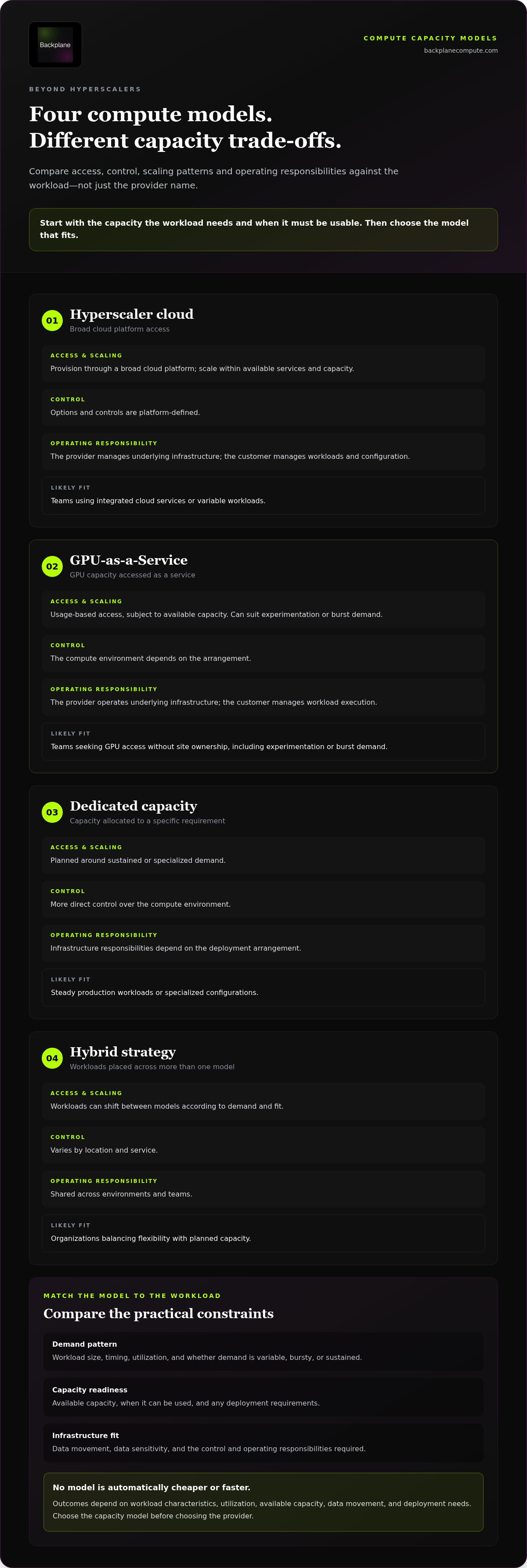
There are four practical models: hyperscaler cloud, GPU-as-a-Service, dedicated capacity, and a hybrid of these options. They differ in more than price or GPU access. Control, operating responsibility, capacity patterns, and infrastructure commitments all shape whether a model fits a workload. For broader context on power, cooling, networking, and facility design, see this high-performance computing infrastructure reference guide.
| Model | Access | Control | Scaling pattern | Operating responsibility | Likely fit |
|---|---|---|---|---|---|
| Hyperscaler cloud | Provision through a broad cloud platform | Platform-defined options and controls | Scale within available services and capacity | Provider manages underlying infrastructure; customer manages workloads and configuration | Teams using integrated cloud services or variable workloads |
| GPU-as-a-Service | Access GPU capacity as a service | Compute environment depends on the arrangement | Usage-based access, subject to available capacity | Provider operates the underlying infrastructure; customer manages workload execution | Experimentation, burst demand, or teams seeking GPU access without site ownership |
| Dedicated capacity | Capacity allocated to a specific requirement | More direct control over the compute environment | Planned around sustained or specialized demand | Infrastructure responsibilities depend on the deployment arrangement | Steady production workloads or specialized configurations |
| Hybrid strategy | Workloads placed across more than one model | Varies by location and service | Workloads shift according to demand and fit | Shared across environments and teams | Organizations balancing flexibility with planned capacity |
On-demand GPU capacity versus dedicated compute
Usage-based GPU access can suit variable experimentation. Teams can align access with active workloads rather than make every project a long-term infrastructure commitment. However, access and continuity depend on the arrangement and available capacity. Dedicated compute changes the control and commitment profile. It may suit steady production or specialized workloads, but it isn’t a universal upgrade. Compare workload demand with capacity access, control, and operational ownership before selecting a model.
Why hybrid compute strategies can make sense
A team might develop in one environment, use another for burst demand, and place predictable production workloads on planned capacity. That division can improve fit, but portability isn’t automatic. Data movement, software dependencies, networking, and operating processes influence whether a workload can move cleanly. The enterprise GPUs-as-a-Service strategy examines service-model considerations in greater depth.
Infrastructure choices also reflect practical constraints around energy use, cost, and security, as discussed in legislative proposals for data center management. For dedicated capacity, assess site power and viability at the outset. Backplane connects compute demand with powered industrial properties through site viability and infrastructure planning.
Are non-hyperscaler compute options reliable, secure, and scalable?
They can be. Non-hyperscaler compute options aren’t inherently less reliable, secure, or scalable, but the label alone proves nothing. Assess the service arrangement, infrastructure dependencies, and workload requirements. A GPU service and a dedicated site can have different operating boundaries, capacity commitments, and recovery responsibilities. Reliability depends on understanding those details, not assuming every alternative works the same way.
Reliability depends on the workload and operating model
A short, interruptible experiment can tolerate different capacity conditions than a long-running training job or production inference system. For each workload, assess how capacity is reserved, what happens if compute or networking is interrupted, how monitoring works, and who owns recovery. Clarify provider responsibilities alongside your team’s role. Don’t assume a particular uptime or performance level unless it’s part of a documented service commitment.
Compute also depends on physical systems working together. Power must meet the load. Networking must support the workload’s data flow. Cooling must manage the heat generated by dense GPU deployments, while maintenance and capacity commitments affect continuity. These are operational inputs, not footnotes. For a closer look at how density shapes thermal design, see liquid-cooled GPU cluster design decisions.
Security and control require specific questions
Security is a fit assessment, not a blanket label. Map provider controls to the workload’s governance requirements. Understand how compute is isolated, who can access systems, where data is processed and stored, and who is responsible for configuration and incident response. The answers may differ between a managed service and dedicated infrastructure.
Separate the provider’s control environment from the safeguards your workload still needs. A provider may operate infrastructure, but your organization remains responsible for deciding how data is classified, which users and processes can access it, and what handling rules apply. Evaluate security claims against those specific needs. Don’t infer a certification, compliance status, or control from the provider category alone.
For scaling compute without hyperscalers, test whether the full arrangement supports the workload during normal operations and disruption. Document capacity access, dependencies, operating ownership, data handling, and recovery expectations before deployment. This turns “reliable, secure, and scalable” from a broad claim into requirements your team can assess.
A practical framework for deciding how to scale compute
Build the decision from the workload outward. A GPU requirement alone doesn’t tell you whether flexible access or dedicated capacity is the right fit. Timing, utilization, data handling, infrastructure readiness, and growth assumptions all shape the answer. Use this sequence to turn demand into a capacity and deployment plan.
Start with workload and capacity requirements
Separate training, fine-tuning, inference, and burst workloads. They can differ in duration, predictability, and tolerance for interruption. For each, record GPU and interconnect needs, storage, data movement, sensitivity, utilization patterns, and target deployment window. A high-density compute capacity checklist can help structure this review.
- 1. Inventory workloads. Group jobs by function, duration, urgency, and sensitivity. Distinguish experimental demand from production requirements.
- 2. Define capacity needs. Document GPU requirements, interconnect, storage, data transfer, and when capacity must be usable. Note expected utilization, not just peak demand.
- 3. Model growth. Set out realistic demand scenarios, including what changes if workloads expand, remain steady, or arrive in bursts. Keep assumptions explicit so they can be revised.
- 4. Compare capacity models. Match variable demand against flexible access and predictable, sustained demand against dedicated capacity. Evaluate control, availability, data handling, and operating responsibilities against the workload, not a provider label.
- 5. Plan deployment. Identify dependencies, owners, decision points, and the conditions that must be met before workloads move. Treat this as a staged plan, not a single procurement choice.
Model operational and infrastructure constraints
For dedicated capacity, technical fit depends on the site as well as the compute. Map power availability, cooling, network connectivity, and site readiness. Then identify who will operate and maintain the environment. If internal teams don’t own every function, make responsibilities clear across the deployment arrangement.
Financing structure and deployment dependencies also belong in the assessment. They shape how a dedicated-capacity project is organized, so evaluate them alongside site viability, compute demand, and infrastructure requirements. Backplane connects powered industrial properties with AI compute demand, assessing site viability and structuring infrastructure financing as part of the project pathway.
This sequence makes scaling compute without hyperscalers a disciplined infrastructure decision. Backplane’s infrastructure approach connects powered sites with compute demand through site assessment and financing structuring.
From compute demand to capacity: where infrastructure partnerships fit
Dedicated AI infrastructure starts with more than a compute requirement. It needs a site where power, cooling, connectivity, and other technical conditions can support the intended workload. Powered industrial properties may offer a starting point, but their previous use doesn’t prove they’re ready for AI compute. A retired plant, closed mill, or decommissioned mining facility still requires technical and economic viability assessment.
How powered sites can support compute expansion
Power is foundational, but so are cooling capacity, network connectivity, and site suitability. A gap in any of these can affect whether a property supports a proposed deployment. Assessment helps determine whether site infrastructure aligns with compute demand, what changes may be needed, and whether the project merits further development.
Site evaluation is a distinct step, not a formality after choosing a location. The facility must make sense for the workload and the project’s operating and financing assumptions. Industrial properties can become part of the capacity equation when their actual conditions match the technical requirements.
How Backplane connects compute demand with infrastructure
Backplane works between compute buyers and powered industrial properties. The project pathway can include assessing site viability, matching suitable properties with committed AI compute demand, structuring infrastructure financing, and supporting deployment. Each stage addresses a different question: Can the site work? Does demand align? How can the project be structured? What is required to move toward deployment?
Compute buyers can also access GPU capacity through GPUs-as-a-Service. This is distinct from dedicated financed sites, which connect compute demand with dedicated infrastructure. One provides service-based access to GPUs; the other centers on developing capacity around a viable powered site. The right route depends on workload requirements and the desired infrastructure commitment.
Scaling compute without hyperscalers ultimately depends on aligning demand with usable capacity, not simply identifying available land or power. Backplane brings those project elements together while keeping site viability and financing structure in view. For dedicated AI capacity, the next step is to assess the path from compute demand to infrastructure deployment.
Build a compute strategy around capacity that works
Scaling compute without hyperscalers is not a simple provider switch. It’s a capacity decision. Match each workload to the right access model, then assess reliability, security, utilization, and operating ownership against real requirements.
For sustained AI demand, the plan may also need to account for physical infrastructure. Power, cooling, connectivity, and site viability shape whether dedicated capacity can support the workload. GPU access and dedicated infrastructure are distinct paths, and a hybrid strategy can combine flexibility with planned capacity.
Backplane connects powered industrial sites with AI compute demand. Its project process can include site viability assessment, infrastructure financing structuring, and deployment support, connecting compute requirements with infrastructure planning.
Talk with Backplane about connecting your AI compute demand with powered infrastructure and assess a capacity strategy built around your workload.
Frequently Asked Questions
Can you scale AI compute without hyperscalers?
Yes. Scaling compute without hyperscalers can involve GPU-as-a-Service, dedicated compute capacity, or a hybrid that keeps some workloads on hyperscaler platforms. The right model depends on workload size, timing, utilization, data requirements, and need for control. Start by defining those needs, then assess capacity access, infrastructure dependencies, operating responsibilities, and recovery requirements. Moving workloads doesn’t remove constraints; it changes where and how you manage them.
What are the alternatives to hyperscaler GPU capacity?
Alternatives include specialized GPU cloud services, dedicated compute capacity, and hybrid arrangements that place workloads across multiple environments. GPU-as-a-Service provides access to GPU resources as a service. Dedicated capacity ties compute access more closely to infrastructure planned for sustained or specialized demand. A hybrid approach can combine flexible access with planned capacity. Compare options by availability, control, scaling pattern, data movement, and who operates the underlying infrastructure.
Is GPU-as-a-Service suitable for enterprise AI workloads?
GPU-as-a-Service can suit enterprise workloads when its capacity model, operating boundaries, and data-handling arrangements match the project’s requirements. It may support development, experimentation, or production compute without requiring the buyer to own and operate the physical site. Enterprises should assess access continuity, workload isolation, networking, storage, monitoring, and recovery responsibilities. Backplane provides GPU-as-a-Service as one path to GPU capacity, distinct from dedicated financed sites.
Can distributed GPU networks handle production workloads?
They can support some production workloads, but suitability depends on how the workload runs and how the network delivers capacity. Batch jobs or tasks that can be divided into independent units may be easier to distribute than tightly coupled training that depends on fast communication among GPUs. Assess network performance, data location and movement, capacity consistency, isolation, monitoring, and recovery. Test the actual workload and operating model rather than assuming distributed capacity fits every production system.
How do dedicated compute sites differ from cloud GPU instances?
Cloud GPU instances generally provide access to compute through a cloud service, while dedicated compute sites center on infrastructure planned around specific capacity requirements. The dedicated model can involve closer alignment with a site and its power, cooling, and connectivity, along with a different commitment and operating profile. It isn’t automatically an upgrade. The specific arrangement determines control, responsibility, flexibility, and how infrastructure decisions are made.
What infrastructure constraints matter when scaling AI compute?
Power is fundamental, but it isn’t the only constraint. Assess whether cooling, network connectivity, and site conditions can support the planned workload. Compute requirements also include GPUs, interconnects, storage, and data movement. Operational capability matters too: identify who handles monitoring, maintenance, access, and recovery. For dedicated capacity, evaluate site viability and financing structure alongside technical fit. A site’s industrial history alone doesn’t establish that it can support an AI deployment.
Is scaling compute beyond hyperscalers always less expensive?
No. Cost depends on the workload, utilization, capacity arrangement, data movement, and operating responsibilities. A usage-based option may align with variable demand, while sustained workloads may call for a different capacity model. Dedicated infrastructure also introduces site and deployment considerations. Compare equivalent workload requirements and account for the full operating model, not just a compute rate. The objective is a suitable, usable capacity plan, not a blanket assumption that one model costs less.


