

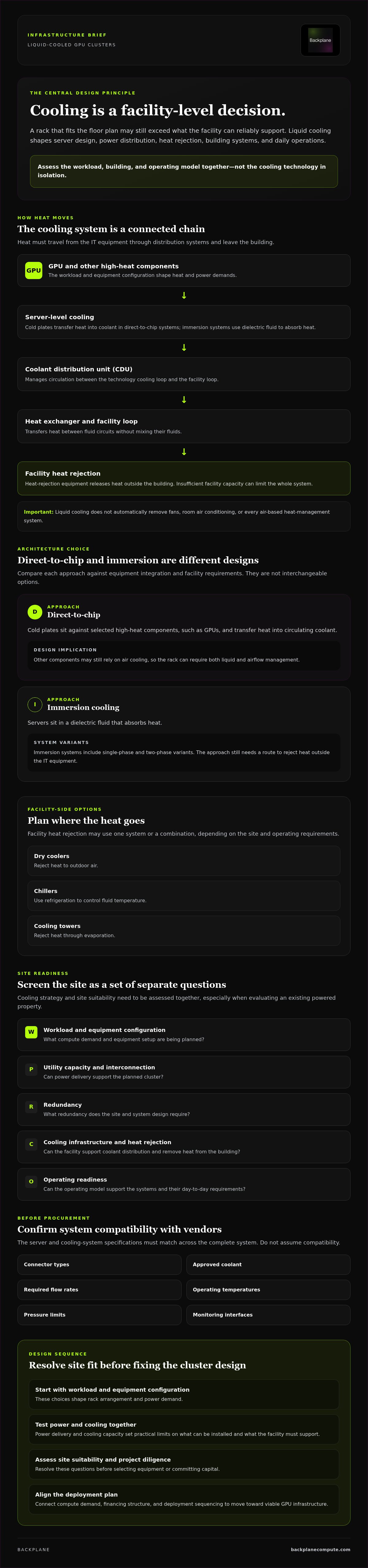
Liquid cooling is a facility-level design decision, not a rack-level add-on. For liquid cooled GPU clusters, the choice affects more than server hardware. It shapes power distribution, heat rejection, building systems, and day-to-day operations. A rack that fits on the floor plan may still exceed what the facility can reliably support.
That’s the central challenge for operators planning high-density AI workloads. You need to know whether the site’s power and cooling systems can support the planned cluster, and whether direct-to-chip or immersion cooling fits the equipment and facility. The answer depends on the workload, building, and operating model, not on a technology preference alone.
This article explains how the main cooling architectures affect cluster design, what facility and operational requirements to assess early, and which questions to resolve before selecting equipment or committing capital. If you’re evaluating an existing powered property, include site viability in the analysis from the start. Cooling strategy and site suitability need to be assessed together.
Key Takeaways
- Evaluate liquid cooled GPU clusters as a complete infrastructure system, from server-level heat transfer to facility heat rejection.
- Compare direct-to-chip and immersion cooling based on equipment integration and facility requirements, not as interchangeable options.
- Screen workload, utility capacity, interconnection, redundancy, cooling infrastructure, and operating readiness as separate site-readiness questions.
- Resolve site suitability and project diligence before selecting equipment or committing capital.
- Align compute demand, financing structure, and deployment sequencing to move from cooling design toward viable GPU infrastructure.
Why Liquid-Cooled GPU Clusters Are Changing Data Center Design
A liquid-cooled GPU cluster is a group of GPU servers that transfers heat from high-power components into a circulating liquid loop, which carries that heat toward a facility heat-rejection system. That definition covers two connected but distinct parts of the design: cooling the IT equipment and removing heat from the building. A rack-level solution cannot compensate for insufficient facility capacity.
This distinction matters as computing loads intensify. GPUs concentrate substantial heat in compact server configurations, so workload, rack layout, electrical delivery, and cooling capacity need to be planned together. Air cooling may still serve parts of the room and server. Liquid cooling does not automatically remove fans, room air conditioning, or every air-based heat-management system.
What makes a GPU cluster liquid-cooled?
In a direct-to-chip system, cold plates transfer heat from GPUs and other components to liquid flowing through the server. In immersion cooling, servers sit in a dielectric fluid that absorbs heat. Immersion systems have distinct single-phase and two-phase variants. Immersion cooling describes the underlying method, but either approach still needs a route to reject heat outside the IT equipment.
A coolant distribution unit (CDU) manages circulation between the technology cooling loop and the facility loop, helping deliver coolant to the IT equipment and return warmed fluid. A heat exchanger transfers heat between two fluid circuits without mixing their fluids. The CDU and heat exchanger connect server-level cooling to the building’s heat-rejection system. They don’t replace the need to confirm that system has enough capacity.
Why cooling belongs in the early design brief
Start with the workload and expected equipment configuration. Those choices shape rack arrangement and power demand. Power delivery and cooling capacity then set practical limits on what can be installed, where it can go, and what the facility must support.
Leave cooling until after equipment selection, and the project may run into constraints in rack placement, coolant routing, electrical infrastructure, or the facility’s ability to reject heat. A design that works on a server diagram may not work in the building. Treat cooling, power, and site suitability as linked diligence questions before committing to a configuration.
For broader context on the physical systems supporting compute, consult the High-Performance Computing Infrastructure reference guide alongside this cooling assessment. If you’re evaluating an existing industrial property, assess cooling strategy alongside available power and site viability, not after the cluster design is fixed.
How Liquid Cooling Works Across a GPU Cluster and Its Facility
Liquid cooling is a chain, not a component. Heat must move from the GPU into a server-level loop, pass through distribution equipment, and ultimately leave the building. A gap in any link can limit the performance of the overall system.
Direct-to-chip cooling and the coolant distribution unit
In direct-to-chip cooling, cold plates sit against selected high-heat components, such as GPUs, and transfer heat into circulating coolant. The liquid carries heat away from the server. Other components may still rely on air cooling, so the rack can require both liquid and airflow management.
The coolant distribution unit (CDU) manages circulation and connects the equipment-side loop with the facility-side loop, often through a heat exchanger. Before procurement, confirm equipment-specific requirements with the server and cooling-system vendors. Check connector types, approved coolant, required flow rates, operating temperatures, pressure limits, and monitoring interfaces. These specifications must match across the system. Don’t assume compatibility.
Where does the heat go after leaving the GPU?
Heat moves from the GPU cold plate through the IT coolant loop to the CDU, across a heat exchanger into the facility loop, and onward to heat-rejection equipment that releases it outside the building. The precise arrangement varies. A heat exchanger transfers heat between fluid circuits without mixing them, while pumps and controls maintain circulation and track system conditions.
Facility-side heat rejection may use dry coolers, chillers, cooling towers, or a combination. The right configuration depends on the site and operating requirements. Dry coolers reject heat to outdoor air; chillers use refrigeration to control fluid temperature; cooling towers reject heat through evaporation. Each option has different implications for climate performance, water demand, equipment footprint, and maintenance. Choose only after a site-specific review.
Design review should also establish how the system handles equipment failure or maintenance. Assess redundancy across pumps and other critical components, water availability where relevant, local climate conditions, and service access. The practicalities of installing liquid cooling extend beyond server connections to the building systems and operating conditions around them.
For liquid cooled GPU clusters, vendor documentation and facility engineering need to converge on one verified design. If you’re evaluating a powered property, Backplane’s property viability assessment can help determine whether it may support AI infrastructure.
Direct-to-Chip vs. Immersion Cooling: Compare the Design Trade-Offs
Direct-to-chip and immersion cooling move heat from GPU equipment in different ways. Direct-to-chip systems use cold plates attached to selected components. Immersion systems submerge servers in dielectric fluid. They aren’t interchangeable labels: each affects hardware integration, service procedures, and facility requirements. Neither is the universal choice. Fit depends on the workload, supported equipment, site conditions, and operating model.
| Design factor | Direct-to-chip | Immersion |
|---|---|---|
| Heat-transfer method | Cold plates transfer heat from selected components into a circulating coolant loop. | Dielectric fluid surrounds the server and absorbs heat. |
| Equipment integration | Requires compatible cold plates, plumbing, connections, and liquid-cooled server configurations. | Requires servers and components validated for immersion, plus compatible tanks and fluid. |
| Facility implications | Requires coolant distribution and heat rejection, while other equipment may still need air cooling. | Requires tank placement, fluid handling, and service workflows suited to submerged hardware. |
When direct-to-chip cooling may fit the design
Direct-to-chip can be a candidate when the selected servers and racks support cold plates and the facility can accommodate coolant distribution. Before specifying equipment, confirm supported configurations, connector standards, coolant requirements, flow and pressure limits, control interfaces, and monitoring. Establish how technicians will isolate, service, and reconnect liquid-cooled components. These details vary by vendor and system, so verify them against current documentation rather than treating them as standard.
When immersion cooling may merit evaluation
Immersion places compatible servers in dielectric fluid, so assess more than thermal design. Verify server and component compatibility, fluid specifications, tank configuration, and how routine maintenance or hardware replacement will work. Consider whether fluid handling, equipment access, and the facility’s heat-rejection approach suit the site. Operational procedures matter as much as the cooling mechanism.
For liquid cooled GPU clusters, compare both approaches against the same workload and site requirements. Ask vendors and engineers to validate performance under intended operating conditions, equipment compatibility, monitoring, maintenance procedures, and facility impacts. Select an architecture through that diligence, not through a broad claim that one method is always more efficient, reliable, or economical.
How to Assess Site Readiness for Liquid-Cooled GPU Clusters
Screen the project before selecting equipment. A site can have substantial power infrastructure and still lack the cooling capacity, layout, or operating conditions a GPU deployment requires. Use this sequence to surface constraints early, then document which assumptions need engineering or utility confirmation. The AI data center site-selection checklist can provide a broader framework for organizing this review.
- Workload: Define the GPU workload, deployment scale, expected duty cycle, and growth assumptions. These establish the basis for estimating compute, power, and heat loads.
- Power: Assess utility capacity and interconnection status separately. Confirm what power is available, what requires utility coordination, and how the proposed electrical design addresses redundancy.
- Cooling: Establish the heat load and assess cooling infrastructure independently of power. Verify the proposed system’s capacity, facility heat-rejection approach, water requirements where relevant, and redundancy with qualified engineering teams.
- Facility: Review existing plant, floor layout, equipment clearances, structural and building constraints, water systems, routing options, and service access. A retrofit may require changes beyond the server area.
- Operations: Confirm equipment compatibility, commissioning responsibilities, monitoring requirements, maintenance procedures, and who owns each operating function.
- Diligence: Record open assumptions, required studies, utility dependencies, and project workstreams before approving equipment or capital commitments.
What should operators validate before equipment selection?
Use the workload definition as a consistent basis for vendor discussions. Ask equipment and cooling vendors to confirm compatible configurations and operating requirements, then have qualified engineering teams assess whether the proposed power and cooling designs fit the site. Clarify commissioning scope and operational ownership in advance. Treat estimates and vendor claims as inputs to diligence, not proof that a facility is ready.
Can an existing industrial facility support the design?
Possibly, but existing infrastructure needs direct assessment. A retired plant or former mining facility may have useful power assets, yet that alone doesn’t establish current utility capacity, interconnection readiness, cooling suitability, building condition, or practical access for installation and service. Treat property viability and infrastructure financing as separate workstreams, each requiring its own diligence.
For liquid cooled GPU clusters, test site suitability against the workload and cooling design together. Backplane assesses powered industrial properties for AI infrastructure viability. Assess a powered site’s viability before committing to an equipment configuration or project capital.
From Cooling Design to Deployable GPU Infrastructure
A cooling diagram becomes a project only when its assumptions connect to equipment, a viable site, compute demand, and a workable capital plan. For liquid cooled GPU clusters, these workstreams need to advance together. Cooling architecture can shape facility scope, site conditions can constrain equipment choices, and deployment sequencing can determine when each infrastructure decision needs to be confirmed.
What belongs in a liquid-cooling project brief?
Build a brief that turns open design questions into assigned diligence. Make it specific enough for vendors, engineers, and project stakeholders to test the same assumptions.
- Workload and equipment: Document workload assumptions, candidate hardware, deployment scale, and expected growth.
- Cooling and facility interfaces: Record the proposed cooling architecture and its connections to power, water systems where relevant, heat rejection, building layout, and service access.
- Owners and open items: Assign responsibility for engineering review, utility diligence, commissioning, and ongoing operations. List unresolved specifications and identify which vendor or engineer must verify each one.
This brief supports sequencing. Confirm site and utility dependencies before locking equipment decisions that rely on them. Then align commissioning responsibilities and operational ownership with the proposed deployment plan. Keep unverified assumptions visible instead of allowing them to become hidden commitments.
When should a site or compute partner enter the process?
Bring in site expertise when powered industrial assets may be suitable for GPU infrastructure, not after hardware and cooling choices are fixed. Site suitability, compute requirements, and financing are distinct diligence tracks, but they inform one another. A realistic view of compute demand helps shape infrastructure scope; site constraints help refine that scope; both inform financing discussions and deployment sequencing.
For procurement-model considerations, consult the enterprise GPUs-as-a-Service guide alongside the site and infrastructure review. Backplane connects compute demand with powered industrial sites, assesses property viability, and supports infrastructure financing structuring. It is a project and infrastructure intermediary, not a cooling-equipment manufacturer.
If an existing powered property is under consideration, a property viability assessment can help determine whether it merits further diligence for AI infrastructure. Treat that assessment as an early project input, not a substitute for engineering, utility, or vendor verification. Test the site against the workload and cooling brief before committing to a deployment path.
Turn Cooling Strategy Into a Viable Project
Liquid cooled GPU clusters demand more than compatible servers. Cooling architecture, power availability, site conditions, and operating requirements must align before equipment selection hardens into a project commitment. Direct-to-chip and immersion each bring distinct integration and facility considerations, so validate the design against both the workload and the building.
The next step is practical: document assumptions, confirm open technical requirements with vendors and engineers, and assess site suitability before committing capital. Power alone doesn’t establish readiness. Cooling infrastructure, utility conditions, and deployment sequencing matter too.
Backplane connects powered industrial sites with AI compute demand. Its scope includes site assessment, financing structuring, and infrastructure deployment. If you’re evaluating a property for AI infrastructure, assess whether your site can support AI compute infrastructure. Start with a property viability assessment to understand whether the site merits further diligence.
Frequently Asked Questions
What is a liquid-cooled GPU cluster?
A liquid-cooled GPU cluster is a group of GPU servers that uses circulating liquid to remove heat from high-temperature components. In direct-to-chip systems, cold plates transfer heat from GPUs into a coolant loop. In immersion systems, servers sit in dielectric fluid that absorbs heat. Both approaches need supporting equipment and a way to reject heat from the facility. The term describes equipment cooling, not a complete facility design.
How does liquid cooling work in a GPU data center?
Liquid cooling transfers heat from GPU components into a circulating coolant loop. In a direct-to-chip design, cold plates absorb heat and the coolant carries it to a coolant distribution unit. A heat exchanger can transfer that heat to a separate facility loop, which moves it to heat-rejection equipment. Pumps, controls, monitoring, and the building’s heat-rejection systems all matter. Verify operating temperatures, flow rates, and coolant specifications with equipment vendors and engineers.
Is liquid cooling better than air cooling for GPU clusters?
Not in every case. Liquid cooling may suit GPU configurations whose heat loads or rack layouts exceed what a facility’s air-cooling design can support. Air cooling may remain appropriate for other equipment or workloads. Compare options against the planned hardware, workload, facility capacity, operating requirements, and maintenance model. Don’t assume one approach is always more efficient, reliable, or economical; validate expected performance for the specific system and site.
What is the difference between direct-to-chip and immersion cooling?
Direct-to-chip cooling uses cold plates to transfer heat from selected components, such as GPUs, into a liquid loop. Other server components may still use air cooling. Immersion cooling places compatible servers in dielectric fluid, which absorbs heat across the submerged equipment. The approaches have different hardware integration, fluid management, servicing, and facility requirements. Check compatibility and operational procedures with vendors before treating either as suitable for a particular cluster.
Can an existing data center support liquid-cooled GPU clusters?
Yes, if its infrastructure and layout can support the proposed equipment and cooling design, but don’t assume existing capacity is sufficient. Assess utility capacity and interconnection, electrical redundancy, cooling and heat rejection, coolant routing, floor layout, water systems where relevant, and service access. Confirm retrofit requirements with qualified engineering and utility teams. A facility that supports conventional servers may still need substantial changes before it can accommodate liquid-cooled GPU clusters.
Does liquid cooling eliminate the need for air conditioning?
No. Liquid cooling can remove heat directly from selected components, but it doesn’t automatically eliminate air cooling or air conditioning throughout a data center. Other server components, networking equipment, and room heat loads may still need airflow and temperature control. Requirements depend on the hardware and facility design. Determine which loads the liquid loop handles and which remain on air, then size and verify both systems accordingly.
What should be checked before choosing a cooling system for a GPU cluster?
Start with the workload, expected deployment scale, duty cycle, and candidate hardware. Then verify vendor requirements for coolant, connectors, flow, temperature, controls, and monitoring. Assess utility capacity, interconnection, power and cooling redundancy, facility heat rejection, layout, water availability where relevant, service procedures, and commissioning ownership. Separate confirmed specifications from assumptions, and ask vendors and qualified engineers to validate compatibility and expected performance under intended operating conditions.
How does liquid cooling affect GPU data center site selection?
Cooling design affects whether a site can support the planned cluster, not just which servers to procure. Assess power availability alongside cooling capacity, heat-rejection options, building layout, infrastructure condition, water systems where relevant, and access for installation and maintenance. Existing powered industrial properties may merit review, but prior use doesn’t prove deployment readiness. A property viability assessment can help identify constraints before equipment selection and project capital commitments.


