

A faster GPU won’t fix a power system that can’t support it, a congested network, or storage that can’t keep data moving. High performance computing infrastructure succeeds as a coordinated system, not a collection of impressive specifications.
That coordination makes infrastructure decisions difficult. Compute, power, cooling, networking, and storage affect one another, while unfamiliar terminology can make options hard to compare. A facility that looks capable on paper may still need technical validation against a specific workload.
This 2026 reference guide explains the core components and how they work together. You’ll learn how to match architecture and deployment choices to workload requirements, assess whether existing facilities can support your needs, and identify what to examine before scaling or sourcing compute capacity. It also compares dedicated infrastructure with external capacity, so you can evaluate the trade-offs against your workload, access needs, and operational responsibilities.
Key Takeaways
- See why high performance computing infrastructure is a coordinated system, not just a supercomputer, GPU server, or cloud account.
- Trace how compute, memory, networking, storage, orchestration, power, and cooling work together to move data and run workloads.
- Compare CPU-led clusters, GPU-accelerated systems, cloud capacity, and dedicated environments against the needs of specific workloads.
- Use a structured assessment to identify bottlenecks, set performance targets, and test whether existing infrastructure can support growth.
- Understand how scaling affects facility requirements and operations, and how GPU-as-a-Service and dedicated financed sites offer different capacity pathways.
What Is High-Performance Computing Infrastructure?
A supercomputer is a visible asset. The infrastructure behind it is the complete environment for running compute workloads: processors and accelerators, memory, interconnects, storage, orchestration, and the facility resources that keep systems operating. A cluster, GPU server, or cloud account may provide part of that environment, but none alone defines the full system.
High-performance computing infrastructure is the coordinated combination of compute, memory, networking, storage, orchestration, power, cooling, and operational support that moves data through workloads and enables them to run. This extends beyond a single machine. As the overview of High-Performance Computing (HPC) explains, HPC describes computing approaches and systems, not one specific supercomputer format.
“High performance” depends on the work being done. One workload may need high throughput across many independent jobs. Another may depend on low latency between processors, large-scale parallelism, or reliable access to capacity by a defined deadline. Start with those requirements, rather than a hardware label, when comparing systems.
Which workloads rely on high-performance computing?
Scientific simulation, engineering analysis, weather modeling, and AI training can all use HPC resources, but they place different demands on infrastructure. A simulation may divide calculations across many processors. AI training can place heavy demands on accelerators, memory, and data movement. Model size, parallelism, data volume, and completion deadlines all affect the balance of resources required.
There is no universal accelerator or cluster design. Some jobs benefit from GPU acceleration; others run effectively on CPUs or need a mix. To identify the right starting point, examine what limits job completion: processor time, memory capacity or bandwidth, network communication, or storage access.
How is HPC infrastructure different from conventional IT?
General-purpose enterprise applications often serve many separate requests, such as database queries or business transactions. HPC jobs may instead split a large problem across multiple processors that must exchange results and stay coordinated. In tightly coupled workloads, communication delays can reduce the benefit of adding compute.
That makes interconnect performance, storage throughput, and job scheduling important alongside processor speed. Systems must place work appropriately, move input data, and return results without creating bottlenecks. Conventional infrastructure can support HPC workloads when its architecture, capacity, and software align with their requirements. The distinction is fit, not a simple divide between ordinary servers and specialized machines.
The Core Layers of High-Performance Computing Infrastructure
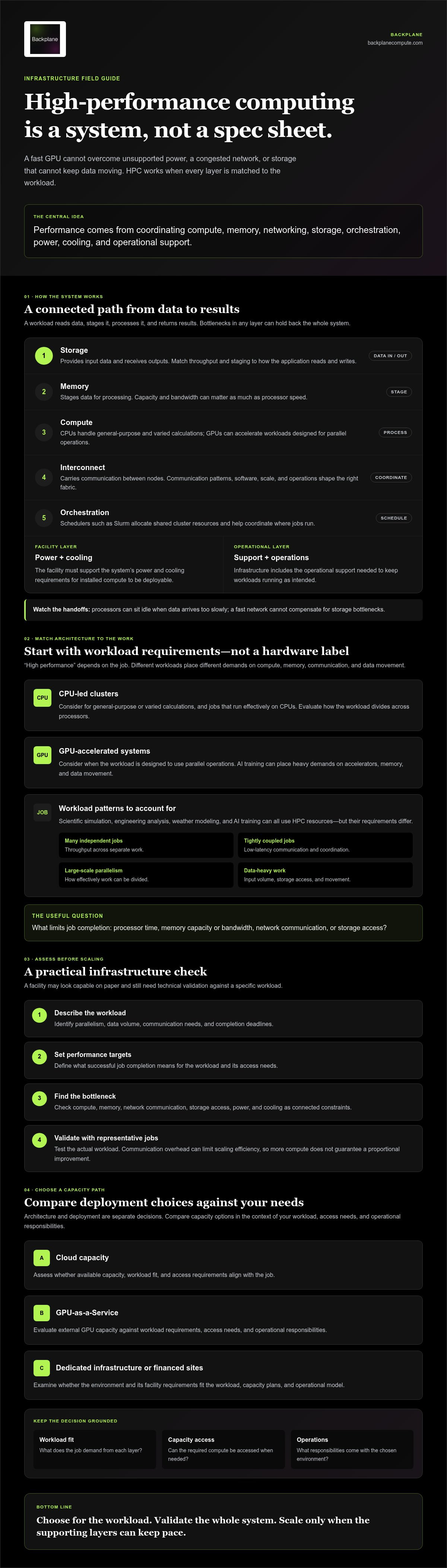
Performance depends on a chain of connected layers. Processors can sit idle if data arrives too slowly. A fast network can’t compensate for storage bottlenecks. Installed compute is only deployable if the facility can support its power and cooling requirements. The HPC Modernization Program offers a government example of HPC as an integrated capability, where infrastructure and operational requirements work together.
A high-performance system is only as effective as the balance between its compute, memory, interconnect, storage, software, and facility capacity. In practical terms, a workload reads data from storage, moves it across a network when needed, stages it in memory, and processes it on CPUs or accelerators. Results then move through memory and storage for later use.
Compute, accelerators, and high-speed interconnect
CPUs handle general-purpose and varied calculations; GPUs can accelerate workloads designed to use parallel operations. Neither is the default for every job. When work spans multiple nodes, the interconnect carries communication between them. InfiniBand and high-speed Ethernet are options, but the right fabric depends on communication patterns, software, scale, and operational needs.
As nodes are added, communication overhead can limit scaling efficiency. If processors spend time waiting for data or synchronizing results, adding compute may not shorten job completion as expected. Check scaling with representative jobs rather than assuming that a larger cluster will deliver a proportional improvement.
Storage, software, power, and cooling
Storage must match how applications read and write data. Repeated access to large datasets can call for different throughput and staging strategies than jobs that load inputs once and write results at completion. Schedulers such as Slurm allocate shared cluster resources, helping coordinate which jobs run and where.
Facility power and cooling set physical limits on deployable compute. Dense accelerator systems can concentrate demand and heat, so facility capacity must align with the planned configuration. Bottlenecks can shift as workloads change: compute, memory access, network traffic, storage, power, or thermal capacity may each become the constraint. Assess these layers together when planning a deployment.
- Compute and memory: Process and hold the working data.
- Interconnect and storage: Move data within the system and to persistent locations.
- Orchestration and facilities: Schedule jobs and support the operating environment.
Organizations assessing whether a powered site can support compute deployment may consider a property viability assessment as part of that evaluation.
How to Match HPC Architecture to Workload Requirements
High performance computing infrastructure isn’t simply a collection of GPUs. Architecture should follow the workload: how it divides work, moves data, responds to latency, and uses capacity over time. SUSE’s overview of High Performance Computing (HPC) also connects compute, networking, storage, and AI, underscoring why component choice alone doesn’t determine fit.
Compare options against measured application behavior, not theoretical peak specifications. Parallelism, data movement, latency, flexibility, and operational ownership all influence the decision. A useful comparison starts with representative jobs and asks what each architecture can support, how capacity is accessed, and who is responsible for operating it.
Which infrastructure fits simulation, analytics, and AI workloads?
Simulation performance depends on how an application divides calculations and communicates between processors. Some jobs scale across CPU-led nodes; others benefit from accelerators. AI training often needs accelerator capacity, fast interconnects, and data pipelines that can supply training data without stalls. Analytics can vary widely, from independent jobs to large data-intensive operations.
Mixed workloads require deliberate allocation. Measure representative jobs, including their memory use, communication patterns, data access, and completion requirements. Compare results across the workloads that matter, rather than assuming one architecture will suit every team or job type.
Cloud, shared clusters, and dedicated infrastructure
Cloud capacity can offer flexibility in how compute is accessed. Shared clusters pool resources, while dedicated environments can provide greater control over the infrastructure assigned to an organization. Each model brings different considerations for capacity access, isolation, utilization, and who manages operations. Choose based on workload characteristics and the level of control required, not on the deployment label alone.
| Architecture | Typical fit and trade-offs to assess |
|---|---|
| CPU-led cluster | For workloads that parallelize across CPUs; assess communication patterns and scaling. |
| GPU-accelerated system | For applications built to use accelerators; assess data pipelines, interconnect, and access to GPUs. |
| Cloud capacity | For variable or project-based demand; assess capacity access, data movement, and operational responsibility. |
| Dedicated environment | For workloads needing controlled, assigned infrastructure; assess utilization, facility fit, and ownership of operations. |
These are starting points, not guarantees of performance. Benchmark representative jobs and validate technical requirements before committing to an architecture. If GPU access is under consideration, an enterprise GPUs-as-a-Service guide can help frame the questions to evaluate, including capacity, workload fit, and operating responsibilities.
How to Assess HPC Infrastructure Before Scaling
Scaling on assumption can waste time and capacity. Build the decision from workload evidence, then test whether the technical environment and facility can support the target. This sequence helps distinguish a compute shortage from a memory, network, storage, or site constraint.
Start with workload evidence and measurable targets
Ask technical teams for representative job profiles, input and output data volumes, utilization patterns, and completion deadlines. Separate baseline demand from occasional peaks. If jobs can be scheduled or batched, account for that flexibility before adding capacity.
Use the evidence to set acceptance criteria before selecting hardware, a provider, or a deployment model:
- Characterize workloads. Record job types, parallelism, data volumes, memory needs, and deadline requirements.
- Measure bottlenecks. Review compute utilization, memory pressure, network traffic, storage behavior, and time spent waiting or communicating.
- Define targets. Specify the job completion, capacity, and access outcomes the proposed system must meet.
- Test fit. Benchmark representative workloads on the candidate architecture or capacity before committing to scale.
Measure typical and peak behavior separately. High peak demand may not justify permanent capacity if jobs can be scheduled, but frequent contention or missed deadlines may point to a persistent gap. Use workload tests to validate assumptions instead of relying on vendor specifications alone.
Validate facility and capacity readiness
Compute capacity is usable only if the supporting site can accommodate it. Review power availability, cooling design, network connectivity, physical space, security needs, and operational constraints with qualified engineering and facility teams. Verify utility capacity and any location-specific requirements directly with the relevant providers and authorities. Don’t assume a site’s stated capacity is available for the intended deployment without technical confirmation.
- Workload: Are utilization, memory, network, and storage patterns documented?
- Performance: Are job completion targets measurable and tested?
- Facility: Have power, cooling, space, connectivity, and security been reviewed?
- Dependencies: Are utility, engineering, location-specific, and operational requirements confirmed by qualified parties?
For a site-based deployment, apply relevant AI data center site selection criteria alongside workload tests. Backplane’s property viability assessment can help organizations assess whether a powered industrial site merits further consideration for compute use.
Scaling High-Performance Computing Infrastructure: From Capacity to Deployment
Growth changes more than the number of processors. It affects usable compute capacity, facility power and cooling, connectivity, operational workload, and how infrastructure is funded. A high performance computing infrastructure plan should connect these decisions to measured demand, so added capacity is technically viable and aligned with how teams will use it.
Plan for operations, utilization, and future growth
Before scaling, determine who is responsible for monitoring, workload scheduling, maintenance, security, and capacity planning. Then compare utilization patterns with demand variability. Consistent workloads may support planning around dedicated capacity; fluctuating demand may make shared or service-based access worth evaluating. Neither model is automatically the better fit.
Financing is another part of the deployment strategy. Consider how the capacity pathway, facility requirements, and operating responsibilities fit the organization’s plans. A financing for AI infrastructure strategy should be grounded in validated workload needs and site readiness, not compute targets alone.
Turn infrastructure requirements into a next step
Prepare a clear brief before assessing capacity or a potential site. Include representative workloads, utilization patterns, performance and completion targets, expected growth, and facility requirements. For a site-based option, document available power, cooling approach, connectivity, space, and known operating constraints. These inputs help separate a capacity question from a property or infrastructure viability question.
Backplane’s pathways address different parts of that decision. GPUs-as-a-Service provides a way to access GPU capacity as a service. Dedicated Financed Sites are a distinct pathway for dedicated site infrastructure. They aren’t interchangeable guarantees, and fit depends on workload requirements, facility viability, and deployment considerations. Backplane also offers Property Viability Assessment and Infrastructure Financing Structuring, and connects powered industrial sites with committed AI compute buyers.
To evaluate whether a site-based or GPU capacity pathway aligns with your requirements, bring the workload profile, capacity targets, and facility information into the discussion. You can discuss an HPC infrastructure requirement with Backplane.
Turn Infrastructure Requirements Into an Actionable Plan
Effective high performance computing infrastructure starts with workload evidence, not a hardware assumption. Define what jobs need, measure where performance is constrained, and set acceptance criteria before choosing a capacity model. Then verify that networking, storage, power, cooling, and operational requirements can support the deployment.
Scaling also involves decisions beyond compute. Utilization patterns shape whether shared or dedicated capacity fits, while facility readiness and financing influence the path from design to deployment. Each decision should reflect validated requirements, not assumed demand.
Backplane connects powered industrial sites with AI compute demand and supports site assessment, financing structuring, and infrastructure deployment. If you’re evaluating capacity options or a potential site, discuss an HPC infrastructure requirement with Backplane.
A clear assessment turns complexity into a sequence of decisions. With the right evidence, you can move forward with greater confidence and build toward infrastructure that fits the work ahead.
Frequently Asked Questions
What are the main components of an HPC system?
Most HPC environments combine compute nodes, memory, an interconnect, storage, and software that schedules and manages workloads. They also depend on suitable facility power, cooling, connectivity, and operational processes. The exact configuration varies by application. A balanced design matters: if network communication, storage access, or facility capacity becomes a bottleneck, additional compute hardware may not deliver the intended benefit.
Is HPC infrastructure the same as a GPU cluster?
No. A GPU cluster can form part of an HPC environment, especially for applications built to use accelerators. The broader infrastructure also includes CPUs, memory, networking, storage, workload scheduling, power, cooling, and operations. Some demanding workloads run effectively on CPU-based systems. Assess application behavior, including its parallelism and data needs, before deciding whether GPUs are necessary or another architecture is a better fit.
How do I choose between cloud and dedicated HPC infrastructure?
Compare workload duration, demand variability, control needs, data movement, operating responsibilities, and access to suitable capacity. Cloud services can offer flexibility; dedicated infrastructure may suit sustained or specialized requirements. Neither model is automatically better. Profile representative workloads and compare technical fit and operational implications before selecting an architecture or capacity arrangement. Include data transfer and facility dependencies in the assessment, not just processor requirements.
Why do networking and storage matter in HPC?
Distributed jobs exchange data between compute nodes, and applications read from and write to storage. If communication or data access can’t keep pace with processing, adding compute may produce limited gains. Review network traffic, storage behavior, and application access patterns together. A single bandwidth figure won’t establish fit on its own; the important question is whether the full data path supports the workload’s requirements.
What should an organization assess before scaling HPC capacity?
Start with representative workloads, current utilization, bottlenecks, data requirements, and measurable completion targets. Then assess compute, networking, storage, facility power and cooling, connectivity, security, and operational readiness. Identify dependencies before choosing a provider or deployment model. Site-specific engineering, utility, and regulatory requirements should be verified by qualified professionals. Use workload testing to confirm that proposed capacity can meet defined technical targets.
Can existing industrial sites support HPC or AI infrastructure?
Some industrial sites may merit evaluation, but their previous use alone doesn’t establish readiness for HPC or AI infrastructure. Assess power availability, cooling options, connectivity, physical conditions, and deployment requirements. Site-specific diligence is essential, and relevant engineering, utility, and regulatory requirements should be confirmed by qualified professionals. Backplane connects powered industrial sites with AI compute demand and supports property viability assessment as part of evaluating potential site fit.


