

The cheapest GPU hour can still produce an unpredictable bill. Predictable AI compute costs depend on more than the rate on a cloud invoice. Workload swings, idle capacity, contract terms, storage, networking, and data transfer all affect total spend.
That uncertainty is difficult to manage when teams need capacity ready for demanding workloads but don’t want to pay for GPUs sitting unused. The answer isn’t simply to choose the lowest hourly rate. It’s to match capacity commitments to demand and account for the infrastructure behind every compute hour.
This article breaks down the main drivers of AI compute costs and compares on-demand, reserved, and dedicated capacity. You’ll learn how to build a total-cost model, assess utilization, and choose an access model that balances flexibility with budget control. It also explains how site-based infrastructure connects compute planning to power and facility requirements, including where Backplane’s GPUs-as-a-Service and dedicated financed sites fit.
Key Takeaways
- Build a total-cost model that accounts for capacity, actual GPU usage, and supporting infrastructure, not just hourly rates.
- Use workload patterns and utilization to identify where forecasts are most exposed to idle or reserved capacity.
- Compare on-demand, reserved, and dedicated capacity by flexibility, utilization risk, and operational responsibility. No single model is lowest-cost for every workload.
- Make predictable AI compute costs easier to manage with low-, expected-, and high-demand scenarios, then review forecasts and contract commitments regularly.
- Include site and power requirements in infrastructure planning, and consider how matching powered industrial properties with committed compute demand can shape capacity decisions.
Why Predictable AI Compute Costs Start With a Clear Cost Model
Annual infrastructure budgets can lose accuracy quickly as AI workloads change. A training run may expand, inference demand may surge, or development work may pause while capacity remains committed. Predictable AI compute costs start with a model that captures these changes, not a forecast built around one assumed level of GPU use.
Cost predictability means being able to forecast spend across capacity, actual consumption, and supporting infrastructure over a defined period. It isn’t simply a matter of choosing the lowest GPU rate. The rate is one input. The cost of delivering usable compute also depends on how long capacity runs, how much work it completes, and what infrastructure supports it. Understanding cloud computing service models provides context for how infrastructure responsibilities and deployment choices can differ.
What belongs in an AI compute cost model?
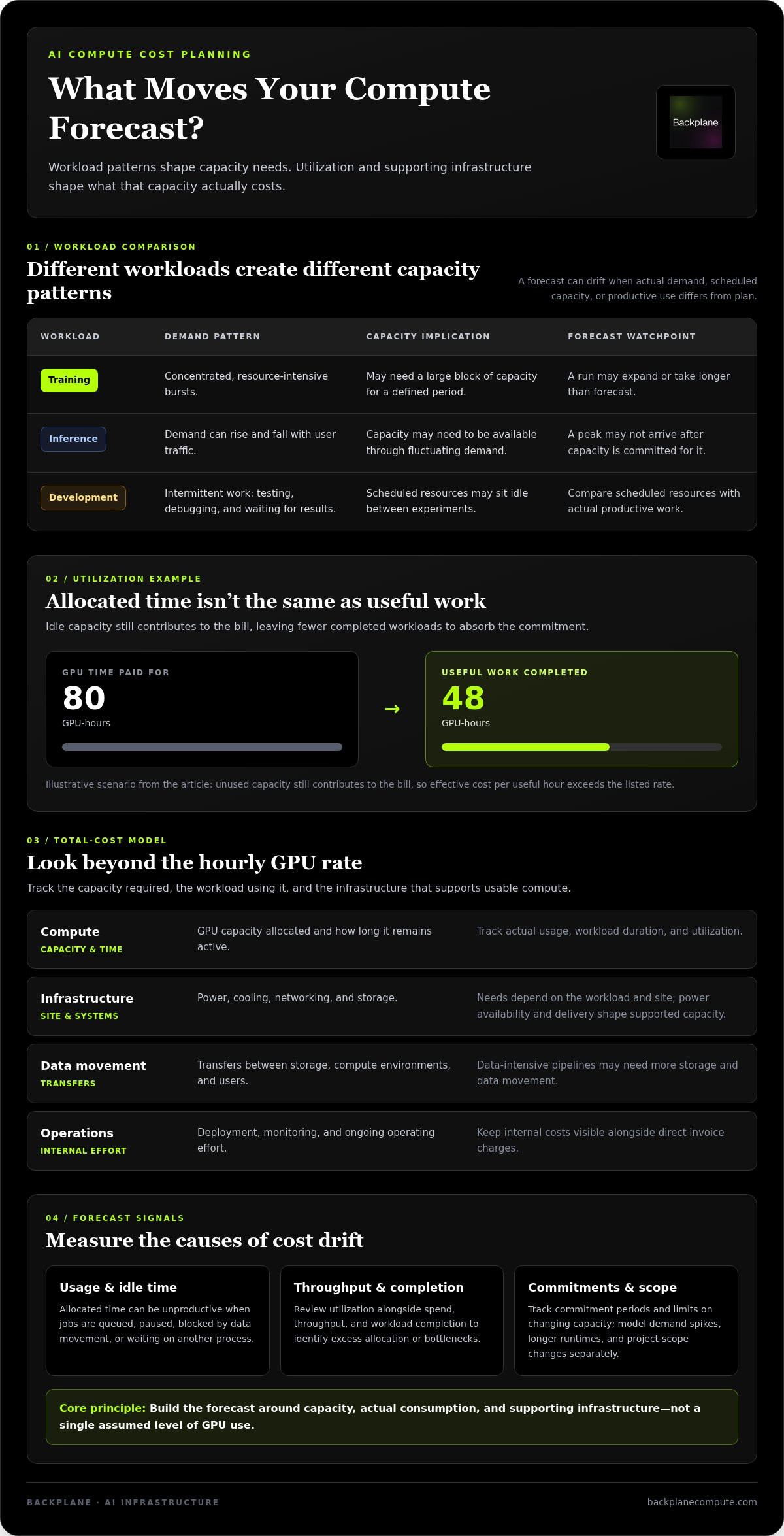
Start by estimating the capacity required and the workload expected to use it. Track workload duration, utilization, and the terms attached to committed capacity, such as the commitment period and any limits on changing it. Then account for supporting infrastructure where applicable:
- Compute: GPU capacity allocated and the time it remains active.
- Infrastructure: Power, cooling, networking, and storage.
- Data movement: Transfers between storage, compute environments, and users.
- Operations: Internal deployment, monitoring, and ongoing operating effort.
Separate direct charges from internal costs. An invoice may capture capacity and infrastructure fees, while engineering and operations effort appears elsewhere in the budget. Keeping both visible gives finance and technical teams a shared view of the total commitment.
Why does an attractive unit rate still produce budget surprises?
A low rate can’t offset capacity that sits idle. If a team pays for 80 GPU-hours but completes useful work in only 48, the unused capacity still contributes to the bill. The effective cost per useful hour is therefore higher than the listed rate suggests.
Illustrative scenario: A team plans a fixed training run, then adds experiments and extends the schedule. It consumes more GPU-hours than forecast. If capacity was reserved in advance, underuse in one period and added demand in another can both strain the budget.
Demand spikes, longer runtimes, and changes in project scope can each affect the forecast. Model them separately. A clear baseline, with explicit assumptions about usage and supporting infrastructure, makes potential sources of variance visible before they become budget surprises.
How GPU Utilization, Power, and Workload Shape Change Your Forecast
Compute spend follows a chain: demand determines how much capacity is scheduled, scheduling determines how much sits ready, and utilization shows how much of that capacity does productive work. A forecast can drift at any point. Training may run in concentrated, resource-intensive bursts. Inference demand can rise and fall with user traffic. Development work may be intermittent as teams test models, debug pipelines, and wait for results.
These patterns create different capacity needs. A long training run may keep GPUs busy but require a large block of capacity for a defined period. An inference service may need capacity available through fluctuating demand. Development workloads can leave scheduled resources idle between experiments. Reserving capacity for a peak can protect workload delivery, but if the peak doesn’t arrive, the commitment may exceed actual need.
How do utilization and idle capacity affect effective cost?
Utilization is the share of allocated GPU time spent doing productive work. Scheduled capacity isn’t the same as productive time: a GPU may be allocated while a job is queued, paused, blocked by data movement, or waiting for another process. When fixed commitments support fewer completed jobs, the effective cost per job rises.
Utilization affects the effective cost of compute because every idle hour leaves fewer completed workloads to absorb the capacity commitment. Track utilization alongside spend, throughput, and workload completion. Together, these measures help show whether the issue is excess allocation, slow execution, or a bottleneck elsewhere in the system.
Which infrastructure costs can move beyond GPU usage?
Some operating choices are within a team’s control: job scheduling, shutting down unneeded capacity, improving data pipelines, and matching resources to workload requirements. Other constraints are tied to the site and its infrastructure. Power availability and delivery shape what capacity can be supported and when, so don’t model them as a universal fixed charge.
Cooling, networking, and storage needs also depend on the workload and site. Distributed training can put pressure on network performance, while data-intensive pipelines may require more storage and data movement. Cooling design is another planning factor: liquid-cooled GPU clusters may suit some infrastructure configurations, while other approaches may fit different site conditions.
Separate controllable operating decisions from external infrastructure constraints in the forecast. Governance matters too: the NIST AI Risk Management Framework offers a structure for setting policies and monitoring AI risks, which can inform how teams assign responsibility for resource use. For projects where power and site viability shape capacity planning, infrastructure planning can connect compute demand to physical requirements.
On-Demand, Reserved, and Dedicated Capacity: Which Model Makes Costs More Predictable?
Capacity models shift where uncertainty sits. On-demand access ties spend more closely to usage, while reserved capacity and dedicated infrastructure involve stronger planning commitments. Each can support predictable AI compute costs when it fits the workload. None guarantees the lowest total cost: utilization, supporting infrastructure, and operating responsibilities still matter.
| Model | Predictability | Flexibility | Utilization risk | Operational responsibility |
|---|---|---|---|---|
| On-demand | Spend follows usage, so the forecast moves with demand. | Generally suited to changing or intermittent needs. | Less risk of paying for idle committed capacity, but usage can grow unexpectedly. | Usually less site-level responsibility; teams still manage workload use and cost controls. |
| Reserved | Commitments can make planned capacity easier to budget. | Less room to adjust if demand changes, depending on terms. | Underuse can leave committed capacity unproductive. | Infrastructure responsibilities depend on the service and agreement. |
| Dedicated | Can align capacity and infrastructure planning around sustained demand. | Changes may require more advance planning. | Capacity that exceeds actual workload can become underused. | Responsibility for operations and infrastructure depends on the project structure. |
When can on-demand GPU access fit a variable workload?
On-demand access can suit workloads that are uncertain, intermittent, or still being measured. Teams can use it to test demand before making longer commitments or handle work that doesn’t run on a stable schedule. The trade-off is exposure to changing usage and the possibility that capacity availability varies. Set budgets, alerts, usage limits, and workload-level reporting so bursts don’t go unnoticed.
When can reserved or dedicated capacity support planning?
Planned commitments may suit teams with recurring workloads and a reliable view of their capacity needs. Before committing, compare expected demand with the commitment period, flexibility to adjust, and consequences of underuse. Reserved capacity and dedicated infrastructure aren’t interchangeable: one is a capacity purchasing approach, while the other can tie compute planning to a specific infrastructure arrangement. In a site-based model, power and facility requirements also enter the decision.
Backplane’s GPUs-as-a-Service provides access to compute capacity, while dedicated financed sites connect compute demand with powered industrial properties. Compare options based on more than GPU allocation: consider utilization, infrastructure requirements, and operational responsibility. Match the strength of the commitment to confidence in demand, not to a hoped-for utilization level.
A Practical Framework for Forecasting and Governing AI Compute Spend
A reliable forecast is a working control system, not a fixed annual estimate. Build it from workload evidence, make uncertainty visible, and update it as usage and infrastructure plans change. This gives finance, engineering, and infrastructure teams a shared basis for approving capacity and adjusting commitments.
What inputs should an enterprise forecast collect?
Start with an inventory of workloads. For each one, record its type, expected volume, runtime, timing, and growth assumptions. Map it to the GPU capacity and deployment model required, and include supporting infrastructure needs where relevant. Label each assumption with its data source and uncertainty so reviewers can distinguish measured usage from estimates.
Use this workflow to turn the inventory into a governed forecast:
- 1. Classify workloads. Separate training, inference, development, and other compute demand. Note when each workload runs and how usage may change.
- 2. Map capacity and commitments. Document the planned GPU allocation, access model, expected utilization, and relevant contract terms.
- 3. Build three scenarios. Model low, expected, and high demand. Vary workload volume, runtime, and growth assumptions instead of relying on a single point estimate.
- 4. Assign costs and owners. Attribute direct compute and supporting infrastructure costs, then name the teams responsible for assumptions, approvals, and updates.
- 5. Review and govern. Compare the forecast with actual usage and completed output on a regular schedule. Revisit commitments when demand or infrastructure requirements shift.
How should teams monitor budget variance after deployment?
Compare planned capacity with actual use, but don’t stop at the bill. Track idle capacity, workload throughput, completed jobs, and changes in power, networking, storage, or other supporting needs. A variance should prompt a diagnosis: did demand grow, did a job run longer, or did allocated capacity fail to produce the expected output?
Set review triggers in advance. Examples include a sustained change in utilization, a new workload entering production, a material shift in runtime assumptions, or a proposed capacity addition. Define who can approve each change and who updates the forecast. Contract governance should capture commitment periods, adjustment options, and renewal decisions alongside the underlying demand assumptions.
For site and infrastructure diligence, use a high-density compute capacity checklist to structure questions about power, facility requirements, and deployment assumptions. This discipline helps make predictable AI compute costs an operating practice rather than a budgeting aspiration. Project assessment and infrastructure planning can connect compute forecasts with the physical requirements of deployment through infrastructure assessment.
How Backplane Connects Compute Demand With Infrastructure Decisions
AI compute planning doesn’t end with choosing a capacity model. For enterprise-scale workloads, the physical site matters too. Power availability, cooling requirements, and deployment assumptions shape what infrastructure can support the demand and how a project should be evaluated. Leaving those factors outside the forecast can create a gap between planned compute capacity and what the infrastructure can deliver.
Backplane connects committed AI compute demand with powered industrial properties and supports infrastructure development. Its work links the demand case to the site and project considerations behind deployment, bringing capacity planning and physical infrastructure into the same decision process.
How can a site-based approach inform cost predictability?
A site-based assessment brings power, cooling, and deployment requirements into view alongside compute demand. These conditions vary by project, so evaluate them rather than treating them as fixed assumptions. A property viability assessment helps determine whether a potential site aligns with a project’s infrastructure needs. This makes site constraints part of cost planning early, without implying a fixed rate, delivery schedule, savings outcome, or guaranteed capacity.
Backplane’s GPUs-as-a-Service and dedicated financed sites represent distinct approaches. GPUs-as-a-Service provides access to compute capacity. Dedicated financed sites connect a project to site-based infrastructure development. The appropriate path depends on how demand, capacity requirements, and infrastructure needs align.
What is a practical next step for enterprise compute buyers?
Bring four inputs into the decision: workload profile, required capacity, expected utilization, and budget horizon. Then assess whether the demand pattern supports flexible access, a planned commitment, or a dedicated infrastructure approach. Include power and site assumptions where they affect deployment. A clear view of these inputs helps expose trade-offs before they become operating constraints.
Backplane supports project assessment and infrastructure financing structuring around project-specific needs. This work connects the demand case to property viability and infrastructure planning, helping teams evaluate how compute requirements and physical realities fit together. Strong cost planning starts with that fit.
Backplane AI compute infrastructure.
Turn Compute Demand Into a More Confident Plan
Better forecasts begin with a complete view of spend: GPU capacity, utilization, workload duration, and the infrastructure required to deliver usable compute. Match on-demand, reserved, or dedicated capacity to demand patterns, then use low-, expected-, and high-demand scenarios to expose budget risk before it reaches the invoice.
Predictable AI compute costs also depend on decisions beyond the cloud account. Power, cooling, site viability, and deployment assumptions can shape whether planned capacity fits the physical infrastructure. Backplane connects powered industrial properties with committed AI compute demand, with options including GPUs-as-a-Service, dedicated financed sites, and property viability assessment.
Workload profile, capacity needs, utilization expectations, and budget horizon are useful inputs for infrastructure planning. Backplane’s AI compute infrastructure services connect compute demand with infrastructure realities.
With clear assumptions and the right capacity strategy, your team can plan compute spend with greater confidence.
Frequently Asked Questions
How can an enterprise make AI compute costs more predictable?
Build a workload-based forecast and update it against actual usage. Record workload type, expected volume, runtime, capacity needs, and supporting infrastructure requirements. Model low, expected, and high demand instead of relying on one estimate. Track utilization and completed workload output alongside spend, then revisit assumptions when demand, workloads, or capacity commitments change. This makes predictable AI compute costs an ongoing planning discipline rather than a one-time budget exercise.
What costs should an AI compute budget include besides GPU usage?
Include the infrastructure and operating costs required to deliver usable compute. Depending on the deployment, that may mean power, cooling, networking, storage, and data movement, as well as internal deployment and operating effort. Separate direct charges from internal costs so finance can see the full resource commitment. Requirements vary by workload and site, so document the assumptions behind each line rather than applying one standard estimate to every project.
Is on-demand GPU capacity more expensive than reserved capacity?
Not in every case. On-demand access ties spend more closely to actual usage and can suit uncertain or intermittent demand. Reserved capacity may make planned usage easier to budget, but its economics depend on commitment terms and whether the GPUs are used enough to justify the commitment. Compare total expected spend across realistic demand scenarios, including idle capacity and flexibility needs. The lowest unit rate alone doesn’t establish the lowest total cost.
Can dedicated AI compute make infrastructure spending easier to forecast?
It can support forecasting when demand is sustained and the project’s capacity and infrastructure requirements are understood. Dedicated infrastructure connects compute planning with considerations such as power, cooling, and site viability. Those factors can make assumptions more explicit, but dedicated capacity doesn’t automatically lower costs or eliminate uncertainty. Assess expected utilization, budget horizon, operational responsibilities, and the flexibility required if demand changes before selecting this approach.
What happens if an enterprise commits to more GPU capacity than it uses?
Unused committed capacity can leave the enterprise paying for resources that complete no workload, depending on the agreement. That raises the effective cost of each job that does run and can limit budget flexibility. Compare the commitment with historical usage and expected demand under low, expected, and high scenarios. Review adjustment provisions and set triggers for reassessing capacity if workload volume, runtime, or utilization moves away from the forecast.
How does GPU utilization affect the effective cost of AI workloads?
Utilization measures how much allocated GPU time performs productive work. If GPUs remain allocated while jobs are queued, paused, or waiting on data, paid capacity may exceed productive compute time. The result is a higher effective cost per completed workload, even if the GPU rate itself hasn’t changed. Track utilization alongside spend, throughput, and completed jobs to find whether idle allocation or another bottleneck is eroding value.
How should finance teams compare GPUs-as-a-Service with dedicated infrastructure?
Compare the models against the same workload profile, capacity needs, utilization expectations, and budget horizon. GPUs-as-a-Service provides access to compute capacity; dedicated infrastructure ties planning to a site and its physical requirements. Include power, cooling, deployment assumptions, operating responsibilities, and commitment flexibility in the analysis. Backplane connects powered industrial properties with committed AI compute demand and offers GPUs-as-a-Service, dedicated financed sites, and property viability assessment.
Discuss your AI compute infrastructure requirements with Backplane.


