

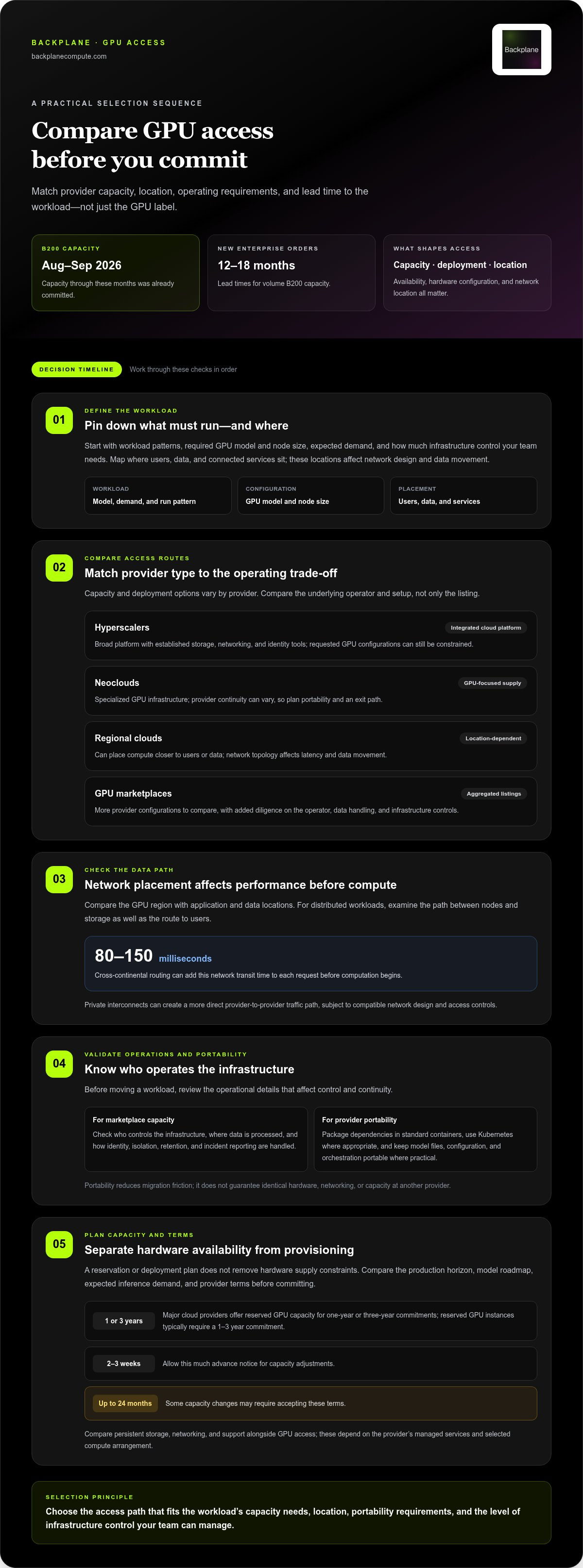
GPU supply is constrained in 2026, but access isn’t limited to hyperscalers. GPU compute without hyperscaler waitlists means comparing capacity across hyperscalers, neoclouds, regional clouds, and marketplaces. B200 capacity through August and September 2026 was already committed, and new enterprise buyers ordering volume B200 capacity faced 12 to 18-month lead times.
That pressure is real, and switching providers is not a simple fix: availability, deployment timelines, hardware configurations, and network location all affect what a team can run and when. The right option depends on the workload and how much control you need over the infrastructure.
This comparison explains how GPU supply and provisioning differ across provider types, what to consider when comparing performance, and how hosted AI infrastructure fits into the decision. Use it to match compute access to your timeline, workload, and operating requirements.
Key Takeaways
- Compare hyperscalers, neoclouds, regional clouds, and marketplaces by available capacity, deployment path, and operational fit.
- Plan GPU demand around workload patterns and commitment terms so reserved capacity supports actual use.
- Separate hardware procurement delays from cluster provisioning timelines when setting deployment expectations.
- Assess bare-metal and distributed-training performance through workload needs, interconnects, and data movement.
- When direct GPU access or dedicated infrastructure is the priority, Backplane’s GPUs-as-a-Service and Dedicated Financed Sites provide routes to evaluate.
GPU supply across hyperscalers, neoclouds, regional clouds, and marketplaces
GPU capacity comes through several channels, each with different access and operating trade-offs. For teams seeking GPU compute without hyperscaler waitlists, the key is to match provider capacity and deployment models to the workload.
Hyperscaler GPU Access
Hyperscalers offer GPU capacity within established cloud platforms, connecting compute to familiar storage, networking, and identity tools. Their scale doesn’t ensure a requested configuration is available when needed. In measured environments, roughly 20 times more GPU capacity was assigned than used. That gap signals scheduling inefficiency, not guaranteed access to idle hardware for every workload.
Compare the requested GPU model, node size, and region with the services already supporting your application. A team using a hyperscaler’s storage and identity tools may value integrated operations. If a specific cluster configuration matters more, available inventory may be the limiting factor.
Neocloud GPU Supply
Neoclouds specialize in GPU infrastructure and can offer an alternative when hyperscaler capacity is constrained. Their supply and continuity vary: two smaller GPU cloud companies shut down or froze new signups in Q1 2026. Reduce migration friction by packaging workloads in standard containers and deploying through Kubernetes. Portable configurations make it easier to move workloads if a provider changes direction.
Before deployment, separate provider-specific services from the containerized workload. Keep model files, configuration, and orchestration portable where practical. This preserves an exit path without assuming another provider has identical hardware, networking, or capacity.
Regional Cloud GPU Supply
Regional clouds place GPU capacity closer to users, datasets, or operations. Location affects network topology: cross-continental routing adds 80 to 150 milliseconds of network transit time to each request before computation begins. Map where data resides and where GPUs run. Private interconnects between providers can create a more direct traffic path, while still requiring compatible network design and access controls.
For inference serving users in a specific area, compare the compute region with the application and data locations. For distributed workloads, examine the path between nodes and storage, not just the distance to end users. Network placement can affect performance before GPU computation begins.
GPU Marketplaces
GPU marketplaces aggregate capacity from multiple providers, making them useful for comparing configurations and deployment options. The trade-off is an intermediary layer between the buyer and the underlying operator. Review who controls the infrastructure, where data is processed, and how identity, isolation, retention, and incident reporting are handled. For sensitive workloads, these operating details matter as much as the listed GPU.
Before moving a workload, package its dependencies in containers, externalize configuration, and test storage and networking assumptions. Then validate data movement between the chosen region and other services. A private interconnect can support provider-to-provider traffic, while cross-cloud access depends on routing, permissions, and compatible network endpoints. To find GPU compute without hyperscaler waitlists, compare these access paths with the workload’s actual location and operating needs.
| Option | Capacity access | Location and network | Operational trade-off |
|---|---|---|---|
| Hyperscalers | Broad cloud platform, capacity constrained | Cloud regions and established services | Integrated tooling, less control over hardware supply |
| Neoclouds | GPU-focused provider capacity | Provider-specific sites and connections | Specialization, portability and continuity planning needed |
| Regional clouds | Provider and location dependent | Can place compute nearer users or data | Topology shapes latency and data movement |
| Marketplaces | Aggregated listings across operators | Varies by underlying provider | More comparison options, added operator diligence |
Choose based on workload location, required capacity, portability, and the level of infrastructure control your team can manage.
GPU provider selection and capacity-planning checklist
Select providers based on workload requirements, not GPU labels alone. Model demand, deployment dependencies, and operating terms before committing.
Hyperscaler Waitlists and Reserved Capacity
Hyperscalers pair GPU access with integrated cloud services, but a requested configuration may not be immediately available. Major cloud providers offer reserved GPU capacity for one-year or three-year commitments, while reserved GPU instances typically require a 1-3 year commitment. Compare that commitment with your production horizon, model roadmap, and expected inference demand before reserving.
For capacity adjustments, allow 2 to 3 weeks of advance notice; some changes may require accepting 24-month terms. Persistent storage, networking, and support depend on the provider’s managed services and the selected compute arrangement. Compare those components alongside GPU access, rather than assuming every reservation includes the same operating layer.
Availability, Performance, and Reliability
Availability depends on the requested GPU configuration and the provider’s allocatable capacity. Performance depends on the hardware, workload, and data path; reliability also depends on the operating model and support arrangements. A marketplace aggregates provider capacity and offers more listings to compare, but the underlying operator still runs the infrastructure.
Ask for a capacity commitment tied to the configuration and deployment window, then align it with your workload plan. Compare service boundaries: who manages the compute environment, persistent storage, networking, and support? This matters for production models, where a GPU allocation alone does not cover the full operating stack.
Use this checklist to turn demand into a practical capacity plan:
- Classify workloads. Separate training, testing, and inference; their GPU profiles and run patterns differ.
- Map deployment requirements. Record GPU configuration, storage needs, network dependencies, and container or orchestration assumptions.
- Set a capacity window. Match the reservation term to the production horizon, and include the 2 to 3 weeks of notice recommended for adjustments.
- Define service boundaries. Identify which party manages compute, storage, networking, and support for each environment.
- Plan for change. Keep models and deployment configurations portable so workloads can move when requirements or capacity shift.
Marketplace listings can reveal aggregated options, but validate each against operational details. Request the GPU configuration, quantity, location, allocation window, and whether capacity is dedicated or shared. Compare these details with the workload’s storage, network, and support needs. Treat a listing as a starting point for capacity planning, not a substitute for a defined deployment commitment.
Use those criteria to build a capacity plan that fits your infrastructure strategy, including this GPU capacity planning approach.
GPU provider provisioning timelines and hardware availability
GPU delivery depends on hardware supply, data center placement, and orchestration readiness. Compare procurement timelines with the time needed to configure a usable cluster.
On-Demand GPU Availability
GPU clouds and marketplaces can offer on-demand NVIDIA compute when listed capacity is allocatable. This differs from buying hardware, which requires procurement and deployment, and from reserved cloud capacity, which trades flexibility for a commitment. On-demand availability still depends on the GPU model, region, and requested configuration.
Traditional AI hardware procurement can take 6-12 months. In 2026, advanced packaging lines such as TSMC CoWoS-S and CoWoS-L had stated lead times of 52 to 78 weeks. Traditional distributor pipelines can take 36 to 52 weeks for high-density compute boards. A specialized infrastructure partner can typically provision a dedicated GPU machine cluster in around 4 weeks.
Current hourly rates for NVIDIA H100, H200, and A100 GPUs vary by model, region, instance configuration, and billing arrangement. Compare those factors and the included storage, networking, and orchestration before assessing the hourly rate.
Immediate US GPU Availability
Immediate access in the United States depends on live inventory in the selected region, not the provider label. A cloud console may return out-of-capacity errors for eight-way or sixteen-way GPU nodes even when smaller configurations are available. Check regional inventory against the requested node size before planning deployment.
Availability also depends on the full hardware configuration and the data center’s ability to provision it. NVIDIA GPUs may be listed across multiple clouds, but a listing does not mean every model or cluster size is ready to launch. Compare the exact GPU, region, node topology, and provisioning status.
Hourly Rentals Without Long-Term Commitments
Hourly-billed, on-demand instances can support short projects without a long-term capacity reservation. Billing follows the provider’s instance terms, while reserved capacity is commonly tied to a defined commitment. Review when billing starts, how usage is measured, and what happens when an instance stops.
There is no single minimum rental period across GPU providers. The minimum session, billing increment, and upfront account requirements depend on the selected instance and provider terms. For experiments or burst inference, compare those rules with expected runtime. For sustained production, compare them with reserved capacity.
Use these steps to translate demand into a deployment plan:
- Specify the NVIDIA GPU model, node size, and region required.
- Separate hardware delivery from cloud provisioning and cluster orchestration.
- Check whether the deployment requires a single GPU or an eight-way or sixteen-way node.
- Compare on-demand billing with reserved terms against expected workload duration.
When hardware is the bottleneck, conventional procurement can mean months of waiting. Once a cluster is provisioned, regional inventory and node configuration become the decisive constraints.
Bare-metal performance and distributed training
Bare metal gives an enterprise direct access to GPU servers without a virtualization layer between workloads and hardware. This can simplify performance tuning, but it does not remove bottlenecks in memory, storage, networking, or orchestration. Before choosing a platform, identify whether the deployment is for single-node inference, model training, or distributed generation.
GPU utilization is a useful operational signal, not a performance guarantee. Production telemetry from non-optimized Kubernetes clusters showed average GPU utilization of 5% between January 2025 and April 2026. A reasonable human-managed baseline for mixed enterprise GPU utilization is around 30%; fully optimized fleets with mixed development, staging, and production workloads often sustain 40% to 70%. Scheduling and workload fit shape the result.
For single-node work, match model memory needs to the accelerator. An NVIDIA H100 SXM has 80GB of HBM3 memory and 3.35 TB/s of memory bandwidth; an H200 SXM has 141GB of HBM3e memory and 4.8 TB/s. Those specifications help teams assess whether models fit and how memory-intensive tasks may behave. They don’t replace testing with the actual model and software stack.
Distributed training adds communication between GPUs and nodes. A fast accelerator can spend time waiting if data exchange, storage reads, or synchronization slows the job. Before production deployment, benchmark a representative training step across the intended node topology. Record throughput, GPU utilization, data loading time, and checkpoint duration. Then test scaling by adding nodes rather than assuming more hardware will produce proportional gains.
Kubernetes can coordinate enterprise workloads, but cluster configuration determines how effectively GPUs stay occupied. Review scheduling rules, resource requests, queue behavior, and workload placement. Separate development and production jobs where contention affects priority. For example, a long training run should not unexpectedly displace latency-sensitive inference. The platform should provide enough telemetry to identify whether the constraint lies in GPU execution, CPU preparation, storage, or network transfer.
- Benchmark the workload. Use the same model, batch pattern, and data path planned for production.
- Measure the bottleneck. Compare GPU utilization with data loading, network communication, and checkpoint activity.
- Test distributed scaling. Increase node count and observe whether throughput rises or communication becomes limiting.
- Validate orchestration. Check Kubernetes scheduling and resource allocation under mixed enterprise workloads.
Choose bare metal when direct hardware control and predictable workload placement matter. Choose a managed cloud platform when integrated operations outweigh low-level tuning. Either way, benchmark a representative workload on the intended hardware and topology, then review telemetry during production workloads.
Hosted-ai infrastructure
Hosted AI infrastructure combines GPU instances, networking, and operations in one deployment model. Choose between managed access and infrastructure control based on workload demands.
An eight-GPU NVIDIA B200 node pools 1,440GB of high-speed GPU memory. That scale supports workloads needing substantial combined accelerator memory, but node capacity alone doesn’t determine performance. Model size, parallelization strategy, storage throughput, and data movement all affect how effectively clusters run.
Provider economics differ. Hyperscalers charge 3-5 times wholesale rates for GPU compute, while specialized GPU cloud providers undercut hyperscalers by 40 to 70% on comparable hardware. Compare the full infrastructure, not just the instance rate: include networking, storage, software operations, and the time GPUs remain active on useful work.
Utilization changes the effective cost of compute. At 40 percent hardware utilization, the effective cost per active compute hour more than doubles. A reserved instance that sits idle between jobs can therefore cost more per productive hour than its headline rate suggests. Match capacity to workload patterns, including training runs, inference traffic, and periods without production demand.
Networking and latency shape hosted AI performance. Place compute near the services and datasets it uses, then assess how traffic moves between storage, GPUs, and inference endpoints. For distributed clusters, communication overhead can constrain scaling even when accelerators are available. Test the complete path with a representative workload before moving production traffic.
Use this deployment sequence to compare hosted options:
- Map model requirements. Record accelerator memory, expected batch sizes, and whether the workload needs a multi-GPU node.
- Separate workload types. Plan training, development, and inference capacity according to their distinct operating patterns.
- Compare operating scope. Identify which infrastructure components are managed and which remain under your team’s control.
- Measure useful output. Evaluate completed model work and active compute time, not instance uptime alone.
For enterprise teams, hosted AI infrastructure can reduce direct hardware operations while shifting decisions toward provider capacity, networking, and service boundaries. Owned infrastructure offers more control but puts deployment and utilization responsibility on the operator. The right structure depends on workload duration, required control, and how consistently the GPUs will run.
To plan the capital structure behind a hosted AI deployment, explore infrastructure financing options.
This section compares hyperscalers and specialized GPU cloud providers. Consider networking, storage, and managed operations alongside GPU compute.
Backplane: GPUs-as-a-Service
Backplane connects AI compute demand with powered industrial sites, creating an alternative path when hyperscaler queues constrain deployment. Its GPUs-as-a-Service offering gives compute buyers direct access to GPU capacity. Teams seeking dedicated infrastructure rather than hosted compute can also pursue Dedicated Financed Sites.
The right structure depends on your operating model. Use hosted GPU capacity when you need compute without building and operating a dedicated site. Consider a dedicated site when long-term infrastructure control is central to your plan. Backplane’s Property Viability Assessment and Infrastructure Financing Structuring support projects to convert suitable powered sites into operational GPU infrastructure.
Contact Backplane to discuss which infrastructure path fits your compute requirements.
Turn compute demand into an infrastructure decision
Make GPU access part of your operating plan, not a last-minute procurement problem. Define which workloads need flexible capacity and which justify a dedicated infrastructure commitment. Then align that choice with your deployment priorities, internal operating capacity, and long-term compute demand.
GPU compute without hyperscaler waitlists is a strategic infrastructure decision as much as a cloud selection. Backplane offers GPUs-as-a-Service for buyers seeking GPU capacity and Dedicated Financed Sites for teams pursuing dedicated infrastructure. A Property Viability Assessment can help determine whether a powered site fits an AI compute project.
Bring your capacity requirements and infrastructure objectives into the next discussion. Discuss GPU capacity with Backplane and identify a practical path for your operation. The right structure starts with a clear view of what your workloads need and how you want to secure it.
Frequently Asked Questions
Is there a GPU shortage in 2026?
Yes, supply remains constrained, especially for advanced hardware and large deployments. Global demand for CoWoS packaging was estimated at roughly 1.0 million wafers in 2026, compared with approximately 370,000 wafers in 2024. Two smaller GPU cloud companies shut down or froze new signups in Q1 2026. For buyers, the practical issue is configuration-specific: access to one GPU model or node size doesn’t ensure access to another.
Where is GPU capacity available in 2026?
GPU capacity is available through hyperscalers, neoclouds, regional cloud providers, and marketplaces that aggregate provider inventory. Teams can also consider dedicated infrastructure rather than relying only on shared cloud instances. Availability depends on the requested GPU, node configuration, region, and deployment timing. Compare options with the workload’s location, data movement needs, and operating model. A marketplace listing or a provider’s broader footprint does not establish that every configuration is ready.
What are the steps to launch a GPU instance on alternative cloud providers?
Start by creating an account and completing the provider’s onboarding requirements. Select a region, GPU configuration, operating environment, and storage and networking options. Configure access credentials and permissions before deploying a test workload. Then verify that the instance can access its required data and dependencies, and monitor performance during the test. For example, run a small inference job before moving a production model to the environment.
What limits, identity checks, or account approval rules can delay GPU access?
Account verification, payment setup, usage quotas, and capacity controls can delay access, depending on the provider. A new account may have limits on GPU quantities or instance types until approval or quota changes are complete. Requested configurations can also be restricted by region or current inventory. Prepare accurate account details, identify the required GPU configuration, and include expected usage when completing onboarding or requesting access.
What U.S. regional availability and data residency options do GPU providers offer?
U.S. GPU providers offer capacity according to their regional footprints and live inventory. Data residency depends on where compute, storage, backups, and related services operate, so assess each component rather than selecting a GPU region alone. Map where data originates, where the instance processes it, and where outputs are stored. For example, a workload can run in one region while relying on storage elsewhere, affecting data movement and residency needs.
What are current hourly prices for NVIDIA H100, H200, and A100 GPUs across providers?
Hourly rates vary significantly by provider tier, commitment length, and current market demand. On-demand NVIDIA A100 instances generally range from $1.50 to $3.00 per hour, H100 SXM5 nodes typically cost between $2.00 and $4.50 per hour, and emerging H200 deployments fluctuate based on strict availability. Platforms like Backplane help teams compare live pricing and secure transparent rates without dealing with traditional waitlists.
What are the security and data privacy risks of using smaller GPU cloud providers?
Smaller providers may shut down or freeze signups, creating continuity risks. Check who controls the infrastructure, where data is processed, and how identity, isolation, retention, and incident reporting are handled.


