

Owning GB300 infrastructure isn’t automatically the lower-cost route; utilization decides whether dedicated capacity earns its keep. GB300 GPU as a service gives you access without requiring you to own the deployment, while ownership can make more sense when workloads are steady enough to keep infrastructure productive.
Owning GPUs gives you direct control, but it also ties up capital and leaves you paying for capacity that may sit idle. GPU-as-a-Service can reduce that upfront commitment, but its economics depend on how much capacity you use and the service terms. The key question isn’t simply which option costs less. It’s how consistently your workloads will use the GPUs.
This comparison explains how utilization affects total cost of ownership, which infrastructure expenses to include, and when access or ownership may be the better fit. It also covers the operational trade-offs behind each model, so you can weigh the commitment against your workload, not just the hardware.
Key Takeaways
- Compare service access with ownership by weighing capital commitment, control, and the risk of paying for idle capacity.
- Model utilization alongside power, facility, and operating costs to see what drives total cost of ownership.
- Assess US GB300 access by deployment format and capacity needs, not provider names alone.
- Use the GB300’s 72-GPU configuration and high-speed interconnect to evaluate whether its scale fits your workloads.
GPU-as-a-service versus owning infrastructure
GB300 GPU as a service gives teams access to Blackwell Ultra computing without owning the full infrastructure. Ownership gives direct control, but utilization must support the ongoing commitment.
GB300 Cloud Specifications and Cluster Sizes
GB300 cluster size describes how GPUs, memory, and interconnect work together; it determines the scale of workloads a deployment can support. An NVIDIA GB300 NVL72 integrates 72 Blackwell Ultra GPUs and 36 Grace CPUs, with approximately 130 TB/s of aggregate NVLink bandwidth. Each GPU has 288 GB of HBM3e memory. A compute tray contains four GPUs and two Grace CPUs, while a typical B300 deployment appears as an eight-GPU node. In cited DeepSeek-R1 benchmarks, GB300 recorded 5,842 tokens per second per GPU offline and 2,907 server-side, outperforming GB200 by 45.18% and 24.92%, respectively. Those results don’t establish a universal ranking against B200 or H100; workload and software affect comparisons. Rental minimums depend on the provider’s reservation model and required cluster.
Provisioning, Availability, and Provider Regions
Provisioning is the process of reserving a cluster and connecting workloads; it determines how quickly capacity can enter production. In the United States, GB300 access depends on provider, region, and available cluster capacity. Compare cloud-catalog access with dedicated reservations, then align the requested GPU count with the workload. Availability and wait times shift with deployable capacity and competing demand. Networking, storage, software, and support are defined by the service configuration, not by the GPU name alone. Confirm that the deployment’s region and connection design suit the application before moving data or workloads.
Security, Workloads, and Service Limitations
Security and workload fit determine whether rented capacity can support production computing. Training and inference for large models can benefit from Blackwell Ultra memory and NVLink bandwidth; agentic applications may also use accelerated inference. Data residency depends on where the cluster and stored data are located. Evaluate access controls, encryption, retention, and compliance evidence against internal requirements. Rental risks include capacity constraints, reservation commitments, and paying for idle GPUs. Confirm which networking, storage, software, and support are included in the chosen service. High-power GB300 infrastructure also makes facility readiness relevant when comparing service access with ownership.
Total cost of ownership and utilization
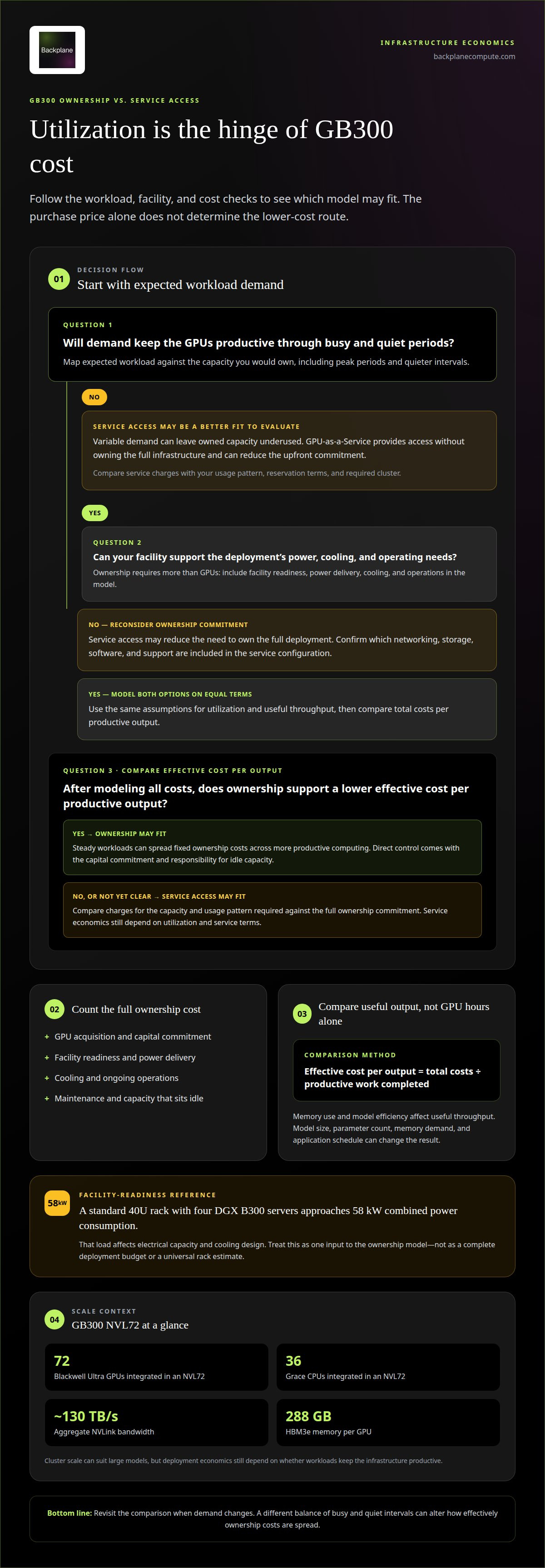
Total cost of ownership includes more than the GPU purchase. For a GB300 deployment, account for infrastructure, power delivery, cooling, operations, and capacity that remains idle. Utilization changes the result: steady workloads spread fixed ownership costs across more productive computing, while variable demand can leave expensive capacity underused.
Power demand makes facility readiness part of the calculation. A standard 40U rack holding four DGX B300 servers approaches 58 kW in combined power consumption. That load affects electrical capacity and cooling design, as well as the amount of infrastructure required to deploy the rack. The purchase price alone cannot capture those ongoing requirements.
- Ownership: Include acquisition, facility readiness, cooling, maintenance, and the cost of unused capacity.
- Service access: Compare charges for the capacity and usage pattern your workloads require against the full ownership commitment.
- Productive output: Track workload throughput, not GPU hours alone; memory use and model efficiency affect useful output.
Use effective cost per output to compare options: divide total costs by the productive work completed. For example, a Blackwell Ultra GPU running reasoning workloads at high utilization may deliver more useful throughput per committed resource than the same GPU sitting idle between jobs. Model size, parameter count, memory demand, and application schedule all affect the result.
Utilization is the hinge. Map expected workload demand against the capacity you would own, then include peak periods and quiet intervals. The GB300 NVL72’s scale can suit large models, but deployment economics depend on whether workloads keep that infrastructure productive. For projects comparing access with ownership, infrastructure financing structuring can connect capital planning with deployment requirements.
Treat that amount as one input to the ownership model, not as a complete deployment budget. Facility work, operating requirements, and idle capacity also affect the cost of productive output, while the workload schedule determines how consistently the system contributes. Compare expected workloads with the service-access alternative using the same assumptions for utilization and useful throughput. Revisit the comparison when demand patterns change, since a different balance of busy and quiet intervals can alter how effectively ownership costs are spread. This keeps the decision focused on productive computing over time, not just the purchase figure.
Which US cloud providers offer GB300 GPU instances or clusters?
For US buyers, the key distinction is the access model: a cloud instance, a reserved cluster, or a dedicated deployment. Provider names and regional capacity can change as infrastructure is deployed. Compare offerings by cluster format, location, reservation terms, and the networking and storage included with compute capacity. A listed GPU model alone doesn’t tell you whether the configuration fits a production workload.
Use this sequence to assess a US offer:
- Identify the deployment format. Establish whether the offer is an individual instance, an eight-GPU node, or a larger cluster. Match the unit to the application’s parallel computing needs.
- Map the region. Compare the deployment location with users, data, and connected systems. Regional placement affects latency and can matter for internal data residency requirements.
- Check the reservation structure. Distinguish capacity reserved for a defined period from capacity accessed on demand. Align the commitment with workload schedules and expected utilization.
- Compare the full configuration. Evaluate compute alongside networking, storage, software, and operational support. These components influence whether a cluster can run the intended workload effectively.
For example, a research team running scheduled model training may prioritize a reserved cluster with predictable access. A team with intermittent inference demand may prefer a more flexible instance model. In either case, compare deployable capacity and expected access timing with the project schedule. An announced deployment or catalog listing isn’t the same as capacity ready for your workload.
Build a comparison of US providers using the same fields: deployment format, region, reservation model, included infrastructure, and access timing. Then assess whether each configuration supports the workload’s software and data environment. This keeps the decision focused on usable capacity, not provider branding or a headline GPU name. The right offer is the one whose available configuration, location, and commitment fit the project’s operating requirements.
Offers may include individual instances, eight-GPU nodes, or larger clusters, with capacity reserved for a defined period or accessed on demand.
What are GB300 GPU cloud specifications, including GPU count, memory, and interconnect?
The NVIDIA GB300 NVL72 combines compute, memory, and high-speed connectivity in a rack-scale system. These specifications determine whether its architecture fits a workload’s model size, communication needs, and deployment footprint.
The system integrates 72 Blackwell Ultra GPUs with 36 Grace CPUs. A DGX GB300 compute tray contains four GPUs and two Grace CPUs; across the rack, 18 compute trays provide the full configuration. This structure matters for parallel workloads because the system is designed to operate as interconnected infrastructure, not simply as a collection of separate accelerators.
Memory figures describe different parts of the configuration. Each Blackwell Ultra GPU has 288 GB of HBM3e memory. A discussed GB300 memory configuration identifies 279 GB of HBM3e and 496 GB over NVLink-C2C. These figures should be read in their architectural context, rather than added together as one pool of GPU memory. The distinction affects how models use high-bandwidth memory and system-level access.
NVLink connects the 72 GPUs with approximately 130 TB/s of aggregate bandwidth. That interconnect supports communication across the rack, an important consideration for distributed training and other workloads that move data between GPUs. A cloud deployment’s practical performance still depends on how its software and workload use the available architecture.
Power and cooling shape whether a facility can support the system. A DGX GB300 rack can consume up to 142 kW, while the liquid-cooled GB300 NVL72 requires more than 120 kW. Those figures make rack density, cooling design, and site power part of infrastructure planning, not secondary details. Match workload scale to the full system footprint before selecting a deployment. Assess GPU site infrastructure against the rack’s power and cooling demands.
Backplane: GPUs-as-a-Service
Backplane connects compute buyers with GPU capacity through GPUs-as-a-Service, offering an access route when owning and operating dedicated infrastructure doesn’t fit the workload or capital plan. For teams assessing GB300 GPU as a service, the key question is whether service access matches demand, deployment requirements, and the desired level of control.
For projects that need dedicated infrastructure, Backplane arranges Dedicated Financed Sites. Property Viability Assessment and Infrastructure Financing Structuring support decisions about turning powered industrial sites into operational GPU infrastructure. These options address distinct needs: access to compute capacity, a dedicated site, or evaluation and financing structure for an infrastructure project.
If you’re weighing service access against a dedicated deployment, contact Backplane or visit backplanecompute.com to discuss the path that fits your requirements.
Make the Next Capacity Decision Deliberately
Turn the technical comparison into an operating decision. Define the workload your team needs to support, how demand may change, and which constraints could affect deployment. Set a review point to revisit those assumptions as models, applications, or business priorities evolve. This keeps infrastructure decisions tied to actual requirements instead of treating today’s capacity plan as permanent.
For teams assessing GB300 GPUs as a service, the useful question is how access fits into the broader infrastructure strategy. A service model, a dedicated site, and a viability assessment address different points in that decision. Backplane can help align the path with the project’s compute and infrastructure needs, without making the hardware choice stand in for the full operating plan.
Discuss GPU options with Backplane and take the next step with a clear view of your requirements.
Frequently Asked Questions
How much does GB300 GPU as a service cost per GPU-hour or cluster-hour?
There isn’t one fixed per-GPU-hour or cluster-hour rate. Pricing depends on the compute capacity, deployment configuration, and contract duration, and is provided after a quote request. For a useful comparison, define the GPU or cluster capacity your workloads need and expected usage duration. Then compare the service quote with ownership costs for the same workload and infrastructure requirements.
What GB300 instance and cluster sizes are available, and what are their minimum rental terms?
Offers may include individual instances, eight-GPU nodes, or larger clusters. Minimum rental terms depend on the provider’s reservation model and the required cluster.


