

A site can be marketed as GPU-ready and still leave critical deployment questions unanswered. For buyers assessing ready-to-use GPU sites, the real test isn’t the label. It’s whether power, cooling, connectivity, and deployment constraints are documented against the workload and timeline.
That uncertainty matters. GPU capacity can be difficult to secure, and a gap between promised readiness and verified infrastructure can put a deployment plan at risk. Advertised capabilities aren’t proof that a site fits your needs.
This guide explains how to assess a candidate site, what evidence to request, and which counterparties should provide it. It also compares dedicated sites with GPUs-as-a-Service and cloud capacity, so you can weigh control, flexibility, and timing against your requirements. Backplane connects compute buyers with powered industrial assets and can support a project through property viability assessment and infrastructure financing structuring. Start with verified requirements, not an assumption of readiness.
Key Takeaways
- Evaluate ready-to-use GPU sites against your workload. The label alone doesn’t confirm deployment readiness.
- Request evidence for power supply, interconnection, capacity, cooling, and documented constraints before advancing.
- Compare dedicated sites, GPUs-as-a-Service, and public cloud by control, commitment, and operational scope. Costs and timelines depend on the project.
- Sequence diligence from workload definition to capacity confirmation, site validation, responsibility allocation, and terms review.
- Distinguish infrastructure that exists today from contracted work and future plans. Backplane may support site viability assessment and financing structuring.
What does a ready-to-use GPU site actually include?
A GPU site is ready only when documented infrastructure conditions match a defined deployment. Readiness depends on the workload requirements and verified site conditions.
A site may have power and space available without having an operational GPU cluster. A GPU cluster brings together GPUs, supporting hardware, software, and interconnects to work as a system. A powered facility prepared for deployment provides the physical environment, but doesn’t prove that cluster equipment is installed, connected, configured, or available to run workloads.
“Ready-to-use” isn’t a universal technical certification or a guarantee of immediate operation. Treat it as a claim to verify against your target configuration and deployment plan.
What should ready-to-use mean for a GPU buyer?
Separate what exists today from what’s planned, assumed, or still awaiting a contract. A readiness package should state which components are included, which must be arranged separately, and who is responsible for each.
- Facility: Confirm available power, the cooling approach, and capacity for the proposed deployment.
- Compute and systems: Establish whether GPUs, networking, and storage are included or must be sourced separately.
- Operations: Clarify what operational support is included, if any, and which party provides it.
- Evidence: Request current documents or other substantiation for each claim, including dates. Ask the provider to distinguish existing infrastructure from contracted work and future plans.
A general statement that a site is “AI-ready” doesn’t show whether its documented conditions fit your deployment. Check the evidence against the actual workload and configuration.
Which buyers may need a dedicated GPU site?
A dedicated site may suit buyers with sustained capacity needs, deployment constraints, or control requirements that call for a defined physical environment. The right fit depends on the project, not the label. Buyers with variable or short-term demand may prefer flexible, on-demand capacity over committing to a dedicated location.
For a closer look at the dedicated-site route, see dedicated AI compute sites. Compare it with on-demand options by the control, commitment, and operational responsibilities each requires. Backplane connects powered industrial properties with AI compute demand. A site assessment can help evaluate whether a candidate asset fits buyer requirements.
How to verify power, cooling, and GPU deployment readiness
Start with the proposed deployment, then test the site against it. Power capacity, cooling design, network access, and operational responsibilities must align with the intended GPU configuration. Power availability alone does not establish that a GPU site is deployment-ready.
For ready-to-use GPU sites, request evidence tied to the specific facility and deployment, not broad claims about the provider’s portfolio. Intel’s overview of Data center GPUs highlights why power and cooling infrastructure belong in the deployment assessment. Have your technical team confirm how the site’s documented conditions match the equipment and workload under consideration.
What power and facility evidence should buyers request?
Ask for current utility documentation and a clear account of the power path. Distinguish capacity already available at the site from capacity that is prospective, pending interconnection, or dependent on future work. Confirm how consumption is metered, what redundancy claims mean in practice, and who is responsible for upgrades or remaining work.
Keep a written register of open dependencies. For each item, record the responsible party, the evidence needed to close it, and any assumptions that affect deployment. A promise to complete work is not the same as completed, verified infrastructure.
How should cooling and connectivity match the workload?
Ask technical teams to document expected rack density, cooling design assumptions, heat rejection requirements, and operating conditions for the intended configuration. Confirm that the proposed cooling approach is compatible with the equipment and identify any commissioning or site work that remains. Don’t rely on a general statement that the facility supports high-density computing.
Then validate the network path. Confirm available connectivity options, bandwidth, route diversity, latency requirements, and the handoff point between site and network providers. Clarify who provisions and manages each connection. Review physical security and operational responsibilities too, including which party handles access, monitoring, and incident escalation.
- Power: Available capacity, interconnection status, metering, redundancy, and upgrade scope.
- Cooling: Design assumptions, heat rejection fit, equipment compatibility, and commissioning status.
- Connectivity and operations: Routes, bandwidth, latency, security controls, handoffs, and named responsibilities.
For a structured review of a powered industrial asset, Backplane’s property viability assessment may help buyers evaluate site fit against their requirements. Confirm current site conditions and project responsibilities with the relevant counterparties before committing.
Ready-to-use GPU sites vs. GPU-as-a-Service and cloud capacity
These routes solve different problems. A dedicated site gives a buyer a defined physical environment to deploy into, but the buyer must establish what infrastructure is included and which responsibilities remain with them or their contracted counterparties. GPUs-as-a-Service provides access to GPU capacity without requiring the buyer to develop a site. Public cloud offers another capacity route, with terms and operational scope set by the selected provider.
There’s no universal winner on cost or speed. Compare project-specific terms, required capacity, workload duration, deployment dependencies, and internal operating capability. A route that looks simple at the infrastructure level may still require separate work to meet technical or operational needs.
When does a dedicated GPU site fit better?
A dedicated site may suit sustained demand, site-specific deployment requirements, or control needs that justify deeper diligence. It may also fit when the buyer has a clear capacity plan and the internal expertise or contracted counterparties to manage the deployment.
Map the full scope before comparing proposals. Confirm whether GPUs, networking, storage, facility infrastructure, and operations are included or arranged separately. Then evaluate utilization and project terms. Without buyer-specific evidence, claims of better economics are speculation.
When is GPU-as-a-Service or cloud a better fit?
Managed capacity may fit when the priority is access to compute without developing a physical site. Consider it for workloads with variable duration or demand, or when the buyer wants a provider to take on defined operational responsibilities. Confirm capacity commitments, service scope, control limits, and how easily workloads can move between environments.
Cloud and GPU-as-a-Service aren’t interchangeable by default. Compare the actual offer: what capacity is available, what the provider manages, and what the buyer must still configure or operate. For a fuller capacity-model comparison, consult the enterprise GPUs-as-a-Service guide. If you’re reviewing facility-provider alternatives, the CyrusOne versus dedicated AI sites comparison can help frame that evaluation.
- Dedicated site: Consider when demand is sustained and control or site requirements warrant diligence and commitment.
- GPUs-as-a-Service: Consider when access to managed GPU capacity matters more than developing a site.
- Public cloud: Consider when its capacity model and operating terms fit the workload and deployment plan.
Choose by matching workload duration and predictability to control requirements, operating capability, and verified deployment conditions. Timelines and costs depend on the specific project and terms, so validate both directly with the relevant counterparties.
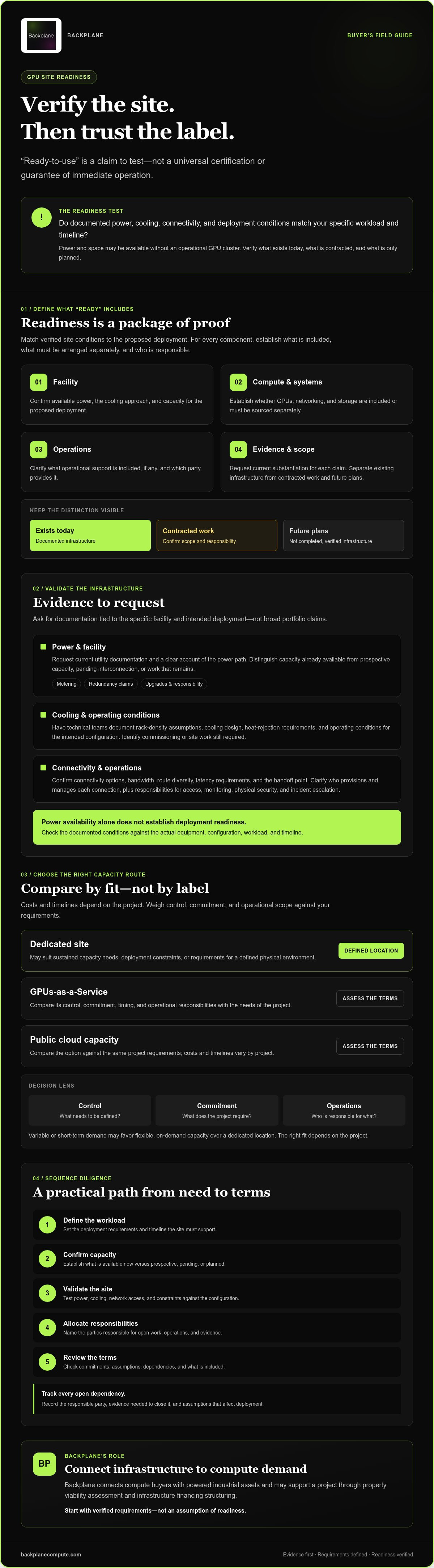
A buyer’s diligence checklist for selecting a ready-to-use GPU site
Run diligence in sequence. First define the workload and deployment requirements. Then confirm that the proposed capacity matches them, validate the site evidence, assign every remaining task to an accountable party, and review the commercial terms against the verified scope. This order keeps a compelling proposal from outrunning the facts.
For each readiness claim, require a written status: existing infrastructure, contracted work, or future plan. Treat unverified capacity, availability, and timelines as open items, not commitments. A broader data center site-selection checklist can add property and location criteria, but it doesn’t replace deployment-specific technical and commercial review.
- Define the workload: Record capacity needs, intended use, deployment constraints, and target milestones.
- Confirm capacity: Establish what is available for the proposed deployment and what conditions or dependencies apply.
- Validate site evidence: Match documents and claims to the requirements, and flag unresolved items.
- Allocate responsibilities: Identify who owns procurement, installation, integration, and ongoing site operations.
- Review terms: Confirm scope, dependencies, financing structure, milestones, and remedies in the transaction documents.
What should the technical diligence file contain?
Assemble current documentation for power, cooling, connectivity, physical security, equipment compatibility, and commissioning. Map each requirement to its supporting evidence, accountable party, and resolution status. Mark missing or outdated materials explicitly so an assumption can’t be mistaken for a confirmed site condition.
Flag issues that may need independent engineering, legal, or commercial review. Record the question, the reviewer needed, and the decision it affects. This creates a traceable basis for a go, pause, or no-go decision.
Which commercial and execution risks need answers?
Transaction documents should define scope, dependencies, financing structure, delivery milestones, and remedies if agreed obligations aren’t met. Confirm who procures and installs equipment, integrates systems, and operates the site after deployment. If responsibilities cross multiple counterparties, document the handoffs and decision points.
Keep financing dependencies and milestone conditions visible. A projected date or capacity figure isn’t a commitment unless the relevant party has documented it. Verify current availability, power status, GPU configuration, timelines, and deal terms directly before proceeding.
For support assessing a powered industrial asset and structuring project financing, explore Backplane’s property viability assessment and infrastructure financing structuring.
How Backplane can help move a viable GPU site toward deployment
Backplane connects powered industrial properties with AI compute demand. The goal is to align buyer requirements with a viable site and a workable project path, not to treat a “ready” label as proof of fit. Depending on the project, buyers may consider GPUs-as-a-Service or pursue a dedicated financed site.
A practical sequence is to define the workload and deployment requirements, assess site viability against them, consider the infrastructure financing structure, then clarify deployment scope and counterparties. A site assessment or financing structure can inform next steps, but neither guarantees capacity, availability, or a delivery date. Verify those details for the specific project.
What information should a buyer bring to an initial discussion?
Bring enough detail to test fit. Summarize the workload type, GPU capacity needs, preferred deployment model, and decision timing. Note requirements that could narrow site options, including connectivity, control, security, and operating responsibilities. Identify the technical, finance, procurement, and executive stakeholders who will review the opportunity and approve decisions.
Clear requirements help distinguish a need for managed GPU access from a dedicated-site path. They also focus the assessment on relevant constraints rather than broad assumptions about what the project might require.
What happens after a site or capacity path looks viable?
Viability is a starting point, not a final commitment. Diligence scope, financing dependencies, deployment responsibilities, counterparties, and milestones depend on the specific project. Technical teams should verify site conditions and equipment fit. Commercial and legal reviewers should assess scope, terms, and obligations. Confirm current site availability, power status, GPU configurations, timelines, and deal terms directly before proceeding.
Keep each open item visible. Record what is verified, what remains conditional, and who must resolve it. This gives stakeholders a clear basis for deciding whether to advance, revise the requirements, or consider another capacity route.
To discuss a GPU site requirement with Backplane, share your workload, capacity needs, deployment preferences, and decision timing through Discuss a GPU site requirement with Backplane.
Move from site claims to a deployment decision
Ready-to-use GPU sites are a fit only when verified site conditions match the workload, configuration, and required timeline. Confirm power, cooling, connectivity, and responsibilities with current evidence. Then compare a dedicated site with GPUs-as-a-Service or cloud capacity based on your control needs, demand profile, and operating capability.
A strong diligence process separates infrastructure that exists from contracted work and future plans. It also makes ownership, financing dependencies, and deployment milestones explicit before commitment. That discipline helps buyers understand what’s confirmed and what still needs resolution.
Backplane connects powered industrial properties with AI compute demand. Its support includes property viability assessment, financing structuring, and deployment management, with the right path depending on project requirements and verification. To discuss your workload and potential site or capacity options, discuss a GPU site requirement with Backplane.
Bring your requirements forward, test the evidence, and discuss your potential site or capacity options with Backplane.
Frequently Asked Questions
What is a ready-to-use GPU site?
A ready-to-use GPU site is a facility whose infrastructure has been assessed for a defined GPU deployment. The phrase isn’t a universal certification or proof that GPUs are installed, capacity is contracted, or operations can begin immediately. Verify power, cooling, connectivity, deployment scope, and outstanding dependencies against your workload. A facility prepared for deployment and an operational GPU cluster are different propositions, so confirm which one is being offered.
How do I know whether a GPU site is actually ready for deployment?
Request current evidence for utility supply, available capacity, cooling design, connectivity, physical security, and commissioning status. Separate installed and verified infrastructure from planned upgrades, assumptions, and future work. Compare documented conditions with your intended GPU configuration, workload, and operating model, and track unresolved dependencies and accountable parties. Independent technical and commercial review may be appropriate before commitment, particularly when a proposed timeline depends on incomplete work.
Can a ready-to-use GPU site include GPUs?
Yes, but the phrase alone doesn’t establish that GPUs are included or installed. Confirm the hardware configuration, quantity, availability, and contractual responsibilities, along with the scope for networking and storage. Some opportunities provide a facility prepared for deployment, while others may include an operational GPU cluster. Treat these as distinct offers and check that the equipment and supporting infrastructure match your workload.
What is the difference between a GPU site and GPU-as-a-Service?
A dedicated GPU site is a facility-level infrastructure path that may involve site diligence, financing, deployment, and ongoing operating responsibilities. GPU-as-a-Service provides access to GPU capacity under a service arrangement, with configuration and responsibilities defined by its contract. Compare control, capacity commitments, scope, workload portability, and internal operating requirements. Neither model is automatically faster or less expensive. The better fit depends on project-specific terms and needs.
How long does it take to deploy GPUs at a ready-to-use site?
There’s no dependable universal deployment timeline. The schedule can depend on verified power and cooling readiness, equipment availability, network delivery, integration, commissioning, and remaining construction or approvals. Request a project-specific schedule that identifies dependencies, milestones, and accountable parties. Confirm which dates are contractual and which are estimates. Don’t use a proposed timeline for business planning until the relevant conditions and responsibilities have been documented.
How much does a ready-to-use GPU site cost?
There’s no single price for a site-level GPU project. Scope may vary with facility condition, power requirements, equipment, cooling, connectivity, financing, and operating responsibilities. Request a project-specific proposal that separates included infrastructure from additional work. Compare options using your workload, utilization assumptions, contract scope, and total responsibilities, not headline figures alone. Verify commercial terms directly with the relevant counterparties before making a commitment.
What should I ask before committing to a GPU site?
Ask what’s operational today, what remains to be completed, and what evidence supports each readiness claim. Confirm power and cooling capacity, connectivity, equipment scope, delivery dependencies, financing terms, operating responsibilities, and remedies for missed obligations. Have technical, legal, and finance teams review the documents. Record open issues, the evidence needed, and an owner for each. Treat unverified capacity, availability, and timelines as diligence items, not commitments.


