

The best reason to move AI off a hyperscaler isn’t that cloud has become obsolete. It’s that a specific workload no longer fits the available capacity or economics. If access to suitable compute is unpredictable, or sustained costs are difficult to forecast, the question of when to move off hyperscaler for AI deserves a workload-level assessment, not a reflexive commitment to another model.
Hyperscalers can still suit experimentation and demand that rises and falls. But as workloads become more consistent, capacity needs more defined, and operating costs more material, the balance can shift. The decision isn’t all or nothing. Identify which workloads are ready to move and which are better left where they are.
This guide explains how to assess workload fit, compare ongoing requirements, and account for migration risk and operational responsibility. It also covers how to test an alternative through GPUs-as-a-Service before considering a dedicated financed site for sustained demand. The goal is a measured transition that builds a credible path to dependable capacity without moving faster than the workload justifies.
Key Takeaways
- Hyperscaler growth alone isn’t a reason to leave. Recurring capacity constraints, unstable forecasts, or workload-specific control needs are stronger signals.
- Assess each workload on its own, comparing utilization, service needs, operating effort, and full costs over the same time horizon.
- Use workload requirements to decide whether flexible hyperscaler capacity, a hybrid model, or dedicated AI compute is the better fit.
- Learn when to move off hyperscaler for AI by testing a bounded workload first, documenting dependencies, and expanding only when results support it.
- For sustained, defined demand, Backplane connects AI compute buyers with powered industrial sites and supports project financing and deployment.
When to move off a hyperscaler for AI: the signals worth acting on
Hyperscaler growth is not, by itself, a reason for an enterprise to leave. Provider investment and market capacity describe the market, not whether a particular workload can get the compute it needs at a predictable cost and under suitable operating conditions. The decision about when to move off hyperscaler for AI should start with repeated friction in a real workload, not a headline or general forecast.
For a baseline on the term, see What is a Hyperscaler? The label matters less than the workload evidence. Look for recurring patterns that affect delivery or limit how the system can operate.
- Recurring capacity constraints: Allocation delays or unavailable compute repeatedly disrupt planned runs or project milestones, rather than affecting only a one-off experiment.
- Unstable cost forecasts: Actual spend varies enough to make planning difficult. That is a reason to model alternatives, not proof that another operating model will cost less.
- Workload-specific control requirements: Requirements for deployment location, data handling, latency, or operational control may make the current setup a poor fit.
Which AI workload signals justify reassessment?
Separate a temporary spike from a sustained operating requirement. A short burst during model evaluation, a product launch, or a limited trial may still suit flexible cloud capacity. A workload with repeatable demand, regular execution, and a stable resource profile is different: its needs can be measured and compared across operating models.
Track evidence over representative operating cycles. Record when capacity requests are delayed, which milestones are affected, how usage changes, and how actual charges compare with forecasts. A single delay may reflect a temporary event. Repeated delays during planned runs point to a capacity issue worth investigating.
Apply the same discipline to cost variability. Identify what drives changes, including shifts in usage, model activity, and related infrastructure needs. Then test whether those patterns can be forecast more reliably under another model. Don’t treat a lower headline rate as a lower total cost. Compare the full workload using consistent assumptions.
Why hyperscaler market growth is not a migration mandate
Market forecasts can signal broad investment or demand. They cannot establish whether your team’s jobs are delayed, utilization is steady, or control requirements are being met. Provider spending trends describe supply decisions at scale. Enterprise decisions require evidence from the workloads being operated.
Be careful with market-share figures. Before relying on a projection, verify its number, timeframe, and definition against the original report, then attribute it to the named source. A percentage without context can make a market trend appear more decisive than it is.
A migration decision depends on workload evidence, not headlines. Reassess when recurring constraints, forecast instability, or control needs materially affect a defined workload. If the pressure disappears when a temporary spike passes, moving infrastructure may add complexity without solving a persistent problem. If the evidence holds, compare alternatives for that workload.
How to assess whether an AI workload has outgrown hyperscaler economics
A workload-level assessment compares what an AI system needs with what each operating model requires to deliver it. Evaluate service levels, utilization, operating effort, and full costs together. A lower compute rate alone is not enough to make a decision. The comparison should include everything needed to run the workload reliably, including the work required to move it.
Use the same workload assumptions and time horizon for every option. Compare like with like: the same demand forecast, performance needs, and operational scope. For detail on the service model, the enterprise GPUs-as-a-Service guide explains how access to GPU capacity can fit into an infrastructure plan.
Build a like-for-like total-cost and utilization view
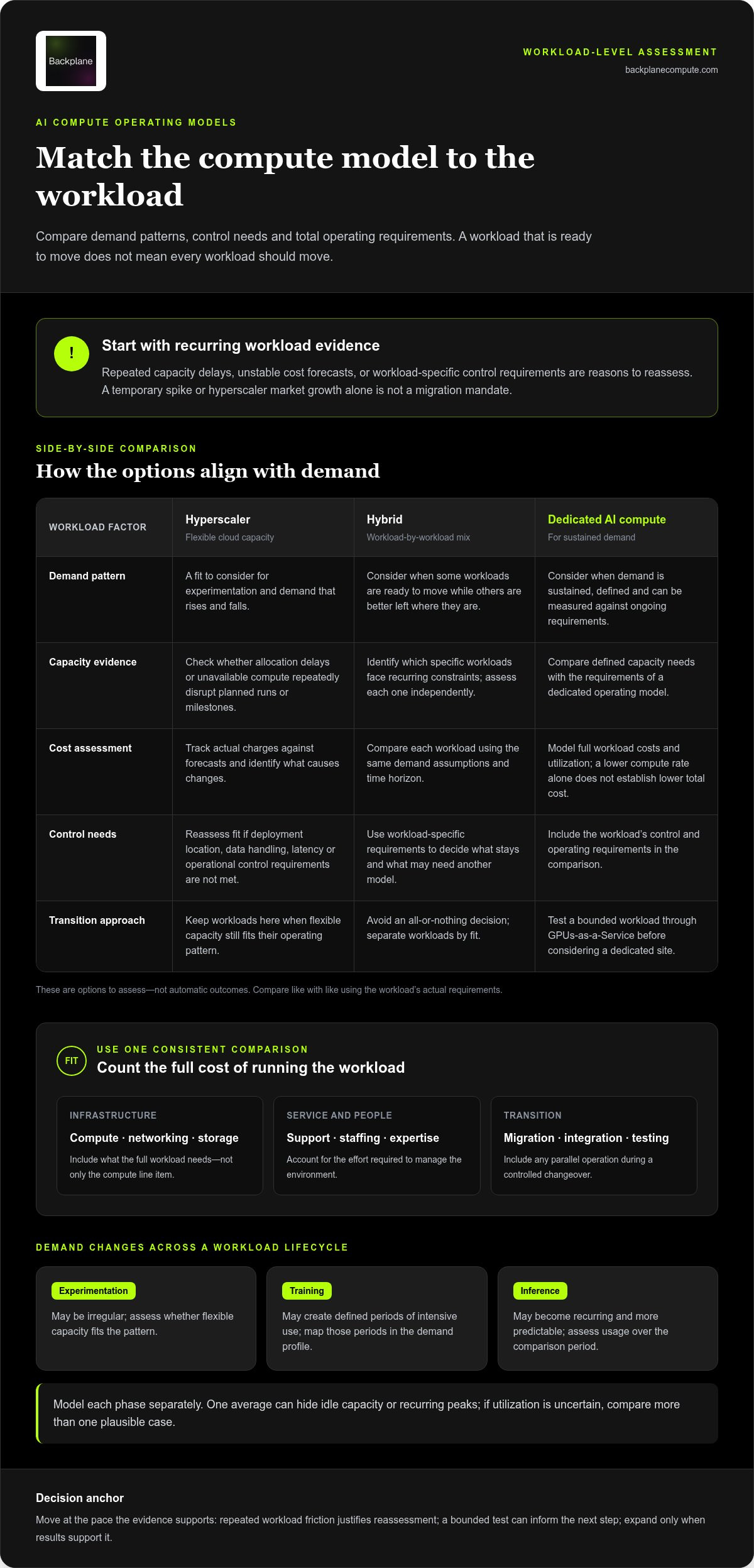
Map demand across the workload lifecycle. Experimentation may be irregular; training may create defined periods of intensive use; inference may become recurring and more predictable. Model each phase separately, then show how demand changes over the comparison period. One average can conceal idle capacity or recurring peaks.
Test utilization against the capacity you would actually reserve or commit to under each model. Include the costs and effort required to operate the workload, not just the compute line item:
- Infrastructure: Compute, networking, and storage needed for the full workload.
- Service and people: Support, staffing, and expertise required to manage the environment.
- Transition: Migration effort, integration work, testing, and any parallel operation during a controlled changeover.
Keep assumptions consistent. If one scenario assumes steady inference demand, use that same demand profile for the alternatives. If utilization is uncertain, model more than one plausible case rather than treating a single forecast as certain. This helps show whether a different structure remains viable as usage changes, without relying on unsupported savings claims.
Account for control, data, and operating requirements
Economics are only part of workload fit. Document requirements for security, governance, data location, and access, then identify the dependencies that shape deployment. Map connections to data sources, applications, and existing cloud services. A workload can appear economical in isolation but require substantial redesign if it depends on surrounding systems.
Assess who will operate each model and what expertise it requires. Account for monitoring, maintenance, incident response, and capacity planning within the organization’s actual operating structure. For enterprises deploying AI agents or synthetic workforce initiatives, specialized consulting and coaching firms like Navo Inc. can help teams build the operational competencies needed to support these systems. A cost comparison that excludes these responsibilities is incomplete.
Workload fit balances cost, control, utilization, and operational capacity. If the assessment points toward sustained demand beyond flexible cloud usage, a powered-site viability assessment can help define infrastructure requirements. Backplane connects AI compute demand with powered industrial sites and project financing. Explore Backplane’s infrastructure approach as part of that evaluation.
Hyperscaler, hybrid, or dedicated AI compute: compare by workload
There is no single operating model for every AI workload. Compare options against the work they must support: how demand changes, how much control is required, and what the team can operate. Hyperscaler capacity can remain the right fit for variable demand and workflows closely tied to existing cloud services. Hybrid placement can separate workloads with different requirements. Dedicated capacity merits evaluation when demand is sustained and defined, not as an automatic upgrade.
| Decision factor | Hyperscaler | Hybrid | Dedicated AI compute |
|---|---|---|---|
| Flexibility | Fits workloads that expand, contract, or change frequently. | Lets teams place variable and stable workloads in different environments. | Can suit a workload with a clearer, sustained demand profile. |
| Capacity planning | Capacity can be adjusted through cloud services, subject to the requirements and availability of the selected resources. | Requires planning across environments, but lets teams align placement with workload patterns. | Requires deliberate planning around defined demand and capacity needs. |
| Control | Works when managed services and existing cloud arrangements meet workload requirements. | Allows control needs to vary by workload and placement. | May warrant consideration when a workload calls for a more defined infrastructure arrangement. |
| Operations | Leverages existing cloud workflows and managed services. | Adds coordination across environments. | Requires the organization to plan for the responsibilities of a dedicated environment. |
| Commitment | Supports changing needs without designing every workload around dedicated capacity. | Balances ongoing cloud use with a more targeted commitment for selected workloads. | Calls for a stronger match between expected demand and the capacity being planned. |
When keeping workloads on a hyperscaler still makes sense
Keep workloads in the cloud when demand is elastic, existing integrations matter, and the setup meets service requirements. Experimentation and intermittent jobs can benefit from not having to plan around a fixed demand profile. Provider scale alone does not make a workload a poor fit. Consider the team’s operating model, too. If it relies on managed cloud services and lacks capacity to take on infrastructure responsibilities, migration may create more complexity than value. For organizations seeking guidance on their cloud environment, working with specialists like IT Cloud Consulting can help evaluate architecture options and optimize existing setups before committing to major infrastructure changes.
When hybrid or dedicated capacity deserves a closer look
Hybrid placement can make sense when one part of the portfolio is steady and resource-intensive while other work remains exploratory or variable. It lets teams evaluate placement by workload rather than forcing one answer across the estate. Dedicated capacity deserves closer analysis when demand is sustained, requirements are well defined, and greater predictability or control may justify added operating responsibility. The question of when to move off hyperscaler for AI is a question of fit, not a verdict on cloud.
Compare models against actual workload patterns, integration needs, and the team’s ability to operate each environment. For a closer look at the dedicated model, explore dedicated AI compute sites. The aim is not to move everything. It is to place each workload where its requirements and operating model align.
How to move an AI workload off a hyperscaler without a big-bang migration
A controlled transition starts with a workload you can isolate, measure, and reverse course on if the evidence changes. Don’t move an entire AI estate at once. Select a bounded use case, document how it runs today, and set acceptance criteria before testing another environment. That gives the team a baseline for judging service performance and operating impact, not just whether the workload starts successfully.
Use this sequence to structure the move:
- Select one workload. Choose a representative use case with clear boundaries, manageable dependencies, and a reason to test a different operating model.
- Document the baseline. Record performance, availability, cost, utilization, and the team effort required to run the workload in its current environment.
- Map dependencies and define success. Capture data sources, software, integrations, access requirements, and measurable acceptance thresholds for the pilot.
- Run a contained pilot. Test the workload against the baseline. Assign decision owners and establish rollback conditions before routing production activity.
- Evaluate, then expand in stages. Review results and operational readiness at each checkpoint. Increase scope only when the evidence supports it.
Include project-level capital planning before a pilot becomes a larger infrastructure commitment. The AI infrastructure financing strategy can help frame financing considerations alongside deployment planning. Keep the technical case and the capital case connected, but assess each using its own assumptions.
Run a contained pilot with explicit exit criteria
Choose a workload that reflects real operating conditions, not an unusually easy test. Document data flows, software dependencies, integrations, and the people responsible for the pilot. Before testing, agree on acceptable performance and availability, how cost will be evaluated, and what operational effort is tolerable. Define rollback triggers and ownership in advance. If thresholds aren’t met, the team should know who can pause or reverse the change.
Scale only after operational readiness is demonstrated
A successful test run is not, by itself, proof that the environment is ready for broader production use. Review monitoring, incident response, access controls, and role ownership. Then expand by workload slice or another clearly bounded increment. At each checkpoint, compare service performance with the baseline and assess whether the team can sustain the additional operating responsibilities.
Staged migration limits exposure by validating workload fit before expansion. This makes the move a series of evidence-based decisions rather than a single irreversible bet. If a sustained workload points toward dedicated capacity, Backplane connects AI compute demand with powered industrial sites and supports project financing and deployment. See infrastructure options for AI compute as you plan the next stage.
How Backplane can support a move beyond hyperscaler AI capacity
The decision to move a workload should follow evidence: a defined capacity need, a clear operating case, and requirements another model can meet. Moving beyond a hyperscaler doesn’t mean moving every workload or committing immediately to a dedicated site. The right next step depends on what the project needs now and how clearly future demand can be defined.
Backplane connects AI compute buyers with powered industrial sites and supports project financing and deployment. This creates a path from compute requirements to infrastructure planning, with options for buyers seeking GPU access and those developing a defined site project.
Match the infrastructure pathway to the demand profile
For buyers seeking GPU capacity without immediately pursuing a dedicated site, GPUs-as-a-Service provides an access route to evaluate. It can address a near-term capacity requirement while the organization develops a clearer picture of sustained demand. For projects with defined, ongoing requirements, a dedicated financed site may be worth assessing. Neither option is a default upgrade; each should match the workload and project stage.
The infrastructure decision also depends on whether a suitable site can support the project. A property viability assessment helps evaluate site fit, while infrastructure financing structuring helps shape the project’s capital approach. Together, these considerations connect compute demand, powered industrial property, and deployment planning, helping frame feasibility before a project advances into a larger commitment.
Define the next decision before committing
Prepare a concise decision brief before selecting a pathway. Capture the workload profile, expected capacity needs, cost assumptions, control requirements, operational responsibilities, and dependencies. Then state the immediate decision plainly: does the project need access to compute, or is it ready to assess a dedicated site?
A useful brief distinguishes current requirements from forecasts. For example, separate current usage from expected growth and document which assumptions would change the infrastructure decision. This helps prevent a temporary capacity concern from becoming an oversized commitment, while giving a sustained project a stronger basis for site and financing analysis.
When weighing when to move off hyperscaler for AI, treat the move as a sequence of decisions, not a single leap. Establish workload evidence first. Match the access or site pathway to the demand profile. Then align project planning with infrastructure and capital requirements.
If your next step is GPU access, site assessment, or structuring a defined infrastructure project, discuss your AI compute requirements with Backplane. Bring the workload profile and the decision you need to make to give the conversation a practical starting point.
Turn the workload decision into a project plan
The decision about when to move off hyperscaler for AI is useful only if it leads to a clear next step. Define the workload, the capacity it requires, and the evidence that would justify a change. Then set the next milestone: validate access to compute, assess a potential site, or structure a dedicated infrastructure project.
For projects ready to move beyond analysis, Backplane connects powered industrial sites with AI compute demand and supports site assessment, financing structuring, and infrastructure deployment. This can help translate a workload requirement into a viable project pathway without treating migration as an all-or-nothing decision.
Bring your requirements into focus and identify the right next move. Discuss your AI compute requirements with Backplane and take the next step with a clearer basis for action.
Frequently Asked Questions
When should a company move AI workloads off a hyperscaler?
Consider a move when a particular workload repeatedly fails to meet its capacity, cost-planning, or control requirements in its current setup. For example, a production service with regular compute demand may warrant a different model if access delays keep affecting planned releases. The decision about when to move off hyperscaler for AI should be based on evidence from that workload, including how often the issue occurs and what operating change could address it.
Is dedicated AI compute always cheaper than hyperscaler cloud?
No. Dedicated capacity can be a poor economic fit if utilization is low, demand is uncertain, or the organization must add substantial operating effort. A workload that runs in short, irregular bursts may benefit more from flexible cloud resources than from committing to capacity it rarely uses. Compare the full cost of each model under realistic demand scenarios, including staffing and transition work, rather than assuming dedicated infrastructure will reduce spend.
Can a company use hyperscalers and dedicated AI compute at the same time?
Yes. An organization can keep cloud-dependent applications and experimental jobs on a hyperscaler while placing a distinct, steady workload in dedicated capacity. For example, a team might leave development and evaluation in its existing environment while assessing another model for a production inference service. Define how data, model versions, access, and outputs move between environments, and account for added coordination or transfer requirements.
How do you compare the total cost of hyperscaler and dedicated GPU capacity?
Build a cost ledger around the same workload and planning period. Include compute, storage, networking, support, staffing, migration, and any parallel operation during transition. Separate recurring expenses from one-time setup and transition effort so they don’t obscure each other. Then test the comparison against different utilization assumptions. This makes it easier to see which inputs drive the result and where a change in demand could alter the decision.
What AI workloads are most suitable for dedicated compute?
Workloads with sustained, well-understood resource needs are often stronger candidates to evaluate than one-off experiments. Examples may include recurring inference services or repeated training jobs with established schedules and requirements. Suitability also depends on whether the workload can be separated from surrounding systems and whether the organization can manage its operating responsibilities. A high compute requirement alone isn’t enough; demand, dependencies, and operational fit matter too.
What should an enterprise test before moving an AI workload?
Test whether the workload performs as required in the target environment, including model behavior, throughput, latency, and integration with essential data and applications. Check that access permissions and governance controls work as intended. Validate representative inputs and outputs, not just a successful startup. Also measure the effort needed to deploy, monitor, and maintain the workload. These checks can reveal gaps that a compute-only benchmark misses.
How can a company reduce risk when migrating AI workloads?
Limit the initial change to a workload with clear boundaries, then run a parallel validation where practical before shifting essential production activity. Preserve the current environment as a fallback until the new setup has been evaluated against agreed requirements. Assign owners for technical decisions, data integrity, and rollback. Keep a record of issues and resolutions during the test. This creates a controlled decision point before any broader expansion.


